
Social Media Marketing with Beaver Builder’s Link in Bio Templates
 -
September 27, 2023
-
September 27, 2023
Beaver Builder’s Free Link Tree Style Landing Page Templates for Link In Bio Pages
Beaver Builder has added an assortment of link tree style landing page templates to our rapidly growing arsenal of free and premium templates available on Assistant.pro! Happily use them for your link in bio pages on Instagram, Tiktok, and beyond. They look great out of the box, but can also easily be customized.
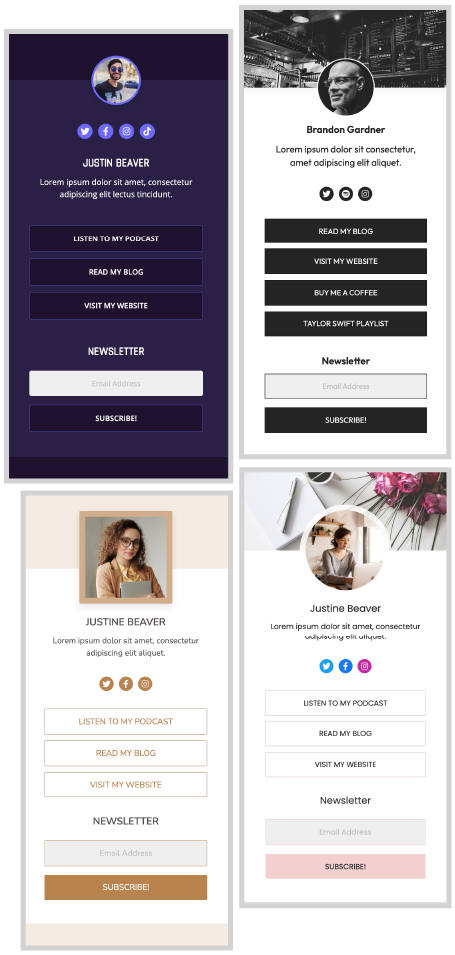
Pictured above, four free templates for Beaver Builder available on Assistant.Pro. Link in Bio: Cyber, Link in Bio: Ode to Gardner, Link in Bio: Latte, and Link in Bio: Floral.
What Does Link in Bio Mean?
The origins of the term link in bio are tied to the fact that Instagram will not allow links within single photo posts. The widespread practice for promoting products, content and affiliations on Instagram became using a hashtag that links back to the content creators bio page, #linkinbio.
What is a Link Tree?
Although you can link to anything from your Instagram bio page, it became popular to use a single column of vertical buttons, often referred to as a link tree.
Why Link Trees Make Effective Landing Pages
One of the core principles of marketing is using a clear Call to Action (CTA). Because the Link Tree format is simply a stack of buttons, there’s little question about what you’re asking users to do. CTA content will vary depending on your niche.
Social Media Influencers: Will typically link to their affiliates. Amazon affiliate pages or brands that sponsor them.
Bloggers, Content Creators and Affiliate Marketers: Often link to their latest blog posts.
Businesses, Consultants and Service Providers: Link to their own products and service pages on their sites.
The Advantages of Using Beaver Builder for WordPress to Create Your Link In Bio Pages
There are popular platforms designed specifically for creating link tree style link in bio landing pages. But there are a few good reasons why you’re better off using WordPress with Beaver Builder’s page builder to create your link in bio page.
- This is a cost effective way to create custom pages. When you pay for a link tree only platform, you won’t have access to the abundance of other tools available in WordPress with Beaver Builder.
- You have complete control over branding. With a link tree only platform, you will have less control over your branding. If you are using a free plan, you will most likely see the service provider’s logo on your landing pages.
- If you decide the link tree style landing page isn’t the best solution for your link in bio page you won’t be limited to that style as you would with platforms dedicated to link tree type pages.
How to Build a Link Tree for Your Link In Bio With Beaver Builder’s Free Templates
Prepare Your Tech Stack
- Open your WordPress site.
- If you don’t already have an Assistant.pro account, get one. It’s free!
- Install the Assistant WordPress plugin on your site. You should also have Beaver Builder’s Page Builder installed on your site.
Add a Link in Bio Template Library to Your Assistant.pro Account
Now that you have your tech stack in place including the Assistant WordPress plugin, you will see a cute little chubby pencil in the upper right corner of your site. That’s the Assistant Pro icon. Click it to open the Assistant WordPress Sidebar.
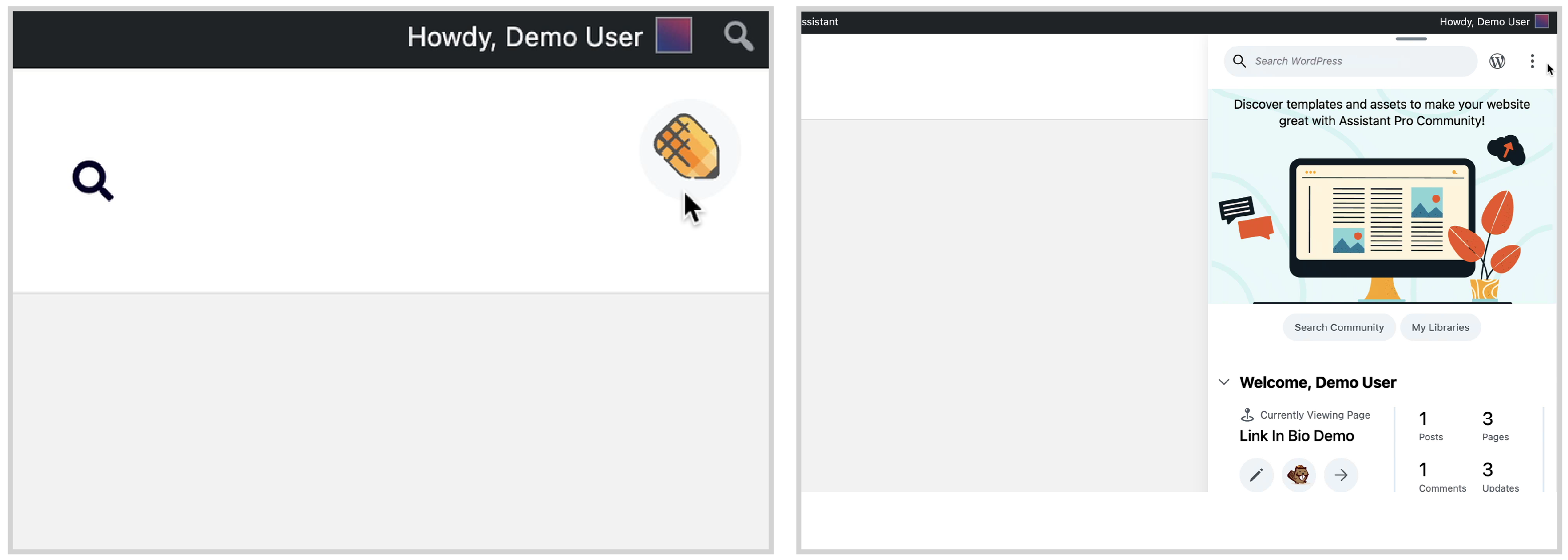
Navigate to the Library tab. This will prompt you to sign in to your Assistant Pro account.
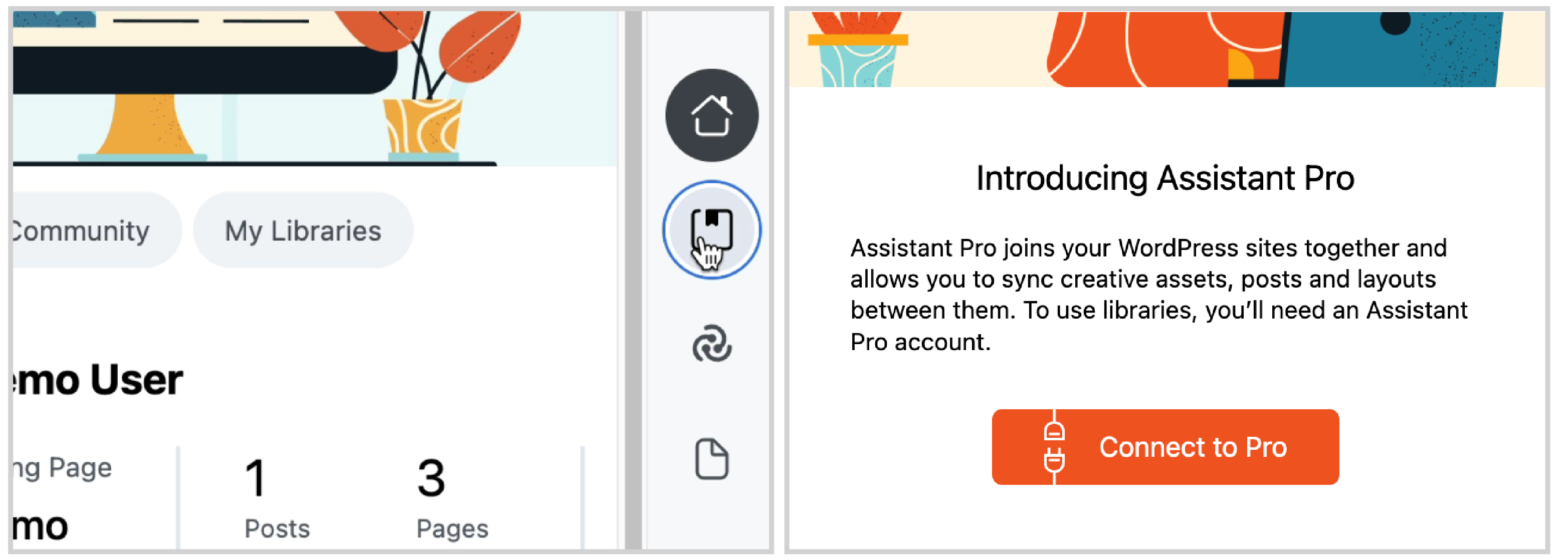
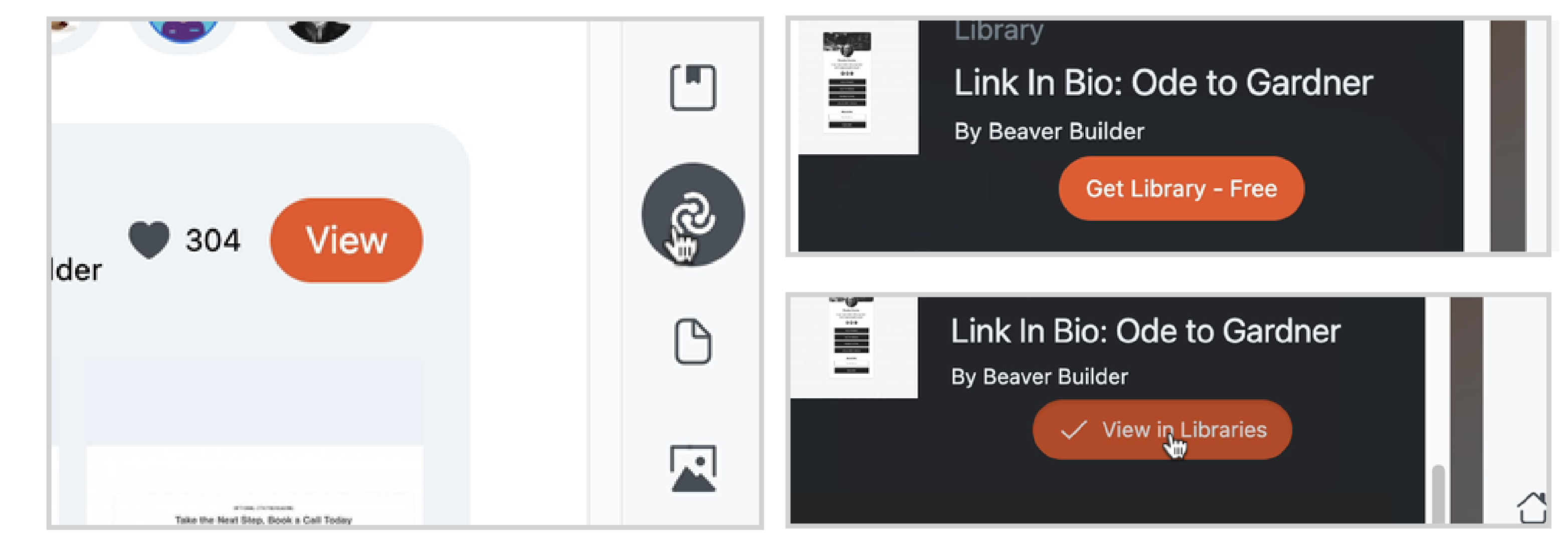
Navigate to the Community tab. Type Link in Bio into the search field, and choose a template. Click the “Get Library” button. That same button will transform to say “View in Libraries”. Click it again and it will take you to the Assistant Pro Libraries App.
Add the Template to Your WordPress Site
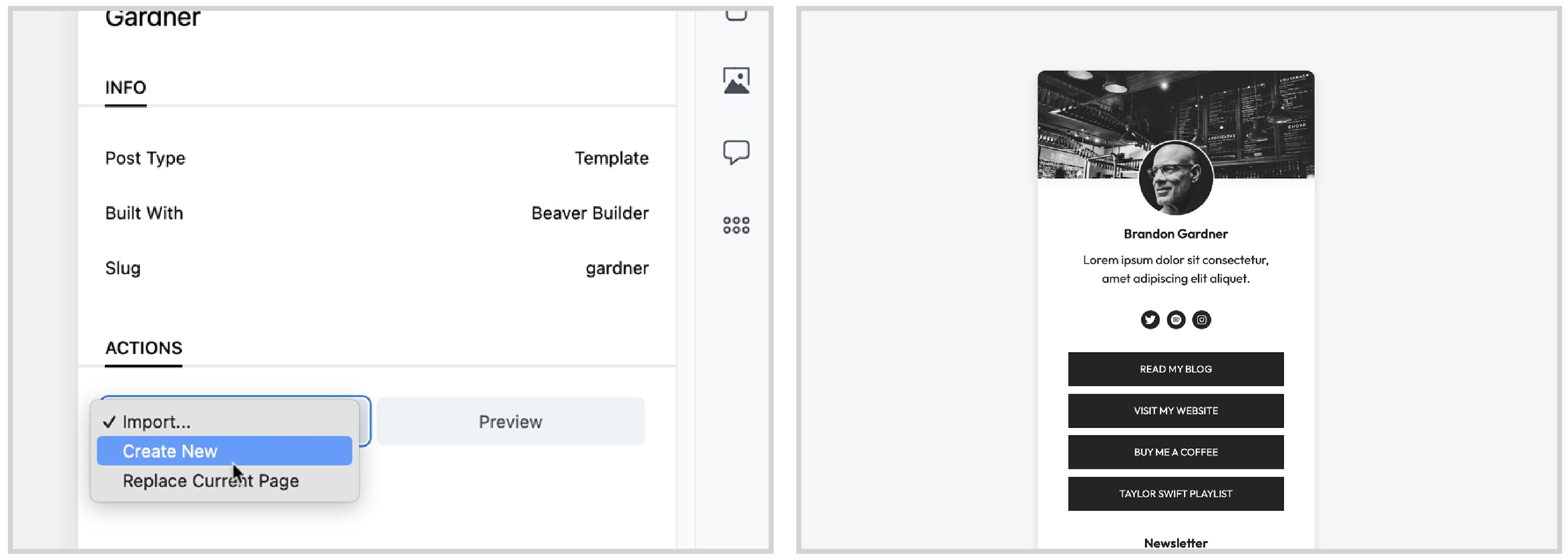
Click on the Beaver Builder Template. Under “Actions” select “Import” to add the Beaver Template which can later be accessed from your site’s Beaver Builder Saved Templates, or, select “Replace Current Page.”
Conclusion
Link Tree style templates are a great way to call social followers to action on Instagram and other social media platforms. Beaver Builder’s Link in Bio Templates are free and fabulous. Enjoy!
Want to learn more about the powers of Assistant, a free plugin and cloud storage platform for WordPress? Check out our free course and user docs!
Related Questions
What is Assistant Pro?
Assistant Pro is a cloud based storage app designed to meet the needs of WordPress creators. The basic plan is free! The Assistant plugin is an always-free plugin for WordPress that connects to the Assistant Pro Cloud, but also allows WordPress users to do an abundance of other cool things like navigate and build their sites with way less clicks.
How do I add links to Instagram?
You can add links to your instagram bio page (Link in Bio) or to Instagram Stories. Learn More at the Instagram Help Center.
How Can I Add My Instagram Feed to WordPress?
Adding an instagram feed to your site is both a great way to keep fresh content streaming to your site and also drive traffic back to your social accounts! Check out our post on how to add an instagram feed to your WordPress site with PowerPack for Beaver Builder.

Our Newsletter
Our newsletter is personally written and sent out about once a month. It's not the least bit annoying or spammy.
We promise.
Try Beaver Builder Today

Related articles
How to Transfer a Claude Design to WordPress (Beaver Builder AI)
 -
September 18, 2026
-
September 18, 2026
Designed a page in Claude? Two ways to transfer a Claude design to WordPress with Beaver Builder AI. Both fully...

Beaver Builder AI 1.0.1: Native Layouts, Easier Connection Troubleshooting, and More
 -
September 18, 2026
-
September 18, 2026
Released 09/14/2026. Requires Beaver Builder 2.11 or later. Full technical changelog: wpbeaverbuilder.com/change-logs Beaver Builder AI 1.0.1 is now available, bringing…
How to Convert a Lovable Design to WordPress Using Beaver Builder AI
-
September 14, 2026
So you built a nice landing page in Lovable, and now you want to move it over to WordPress, where…
Join the community
We're here for you
There's a thriving community of builders and we'd love for you to join us. Come by and show off a project, network, or ask a question.


Since 2014
Ready to build?
The WordPress page builder agencies and freelancers have trusted since 2014. Now with AI.