

Beaver Builder AI 1.0.1: Native Layouts, Easier Connection Troubleshooting, and More
 -
September 18, 2026
-
September 18, 2026
Released 09/14/2026. Requires Beaver Builder 2.11 or later. Full technical changelog: wpbeaverbuilder.com/change-logs
Beaver Builder AI 1.0.1 is now available, bringing improvements to AI-connected workflows, native Beaver Builder layouts, Design Kits, Components, and more.
This release focuses heavily on making AI-built pages more reliable, easier to troubleshoot, and more consistent with the way you build websites in Beaver Builder.
Table of Contents
- Choose How AI Builds Native Layouts
- Test Your Connection Before Troubleshooting
- AI-Built Pages Get Automatic Contrast Corrections
- Design and Code Tabs Are Now On by Default
- Components Get Several Improvements
- More Reliable Design Kit Imports
- Better AI Editing for Native Beaver Builder Pages
- Staging and Themer Improvements
- Frequently Asked Questions
- Update to Beaver Builder AI 1.0.1
Choose How AI Builds Native Layouts
Beaver Builder AI now gives you more control over how connected AI clients build native Beaver Builder layouts. A new MCP Layout Structure option lets you choose whether native sections are built using Rows and Columns or Box Modules:
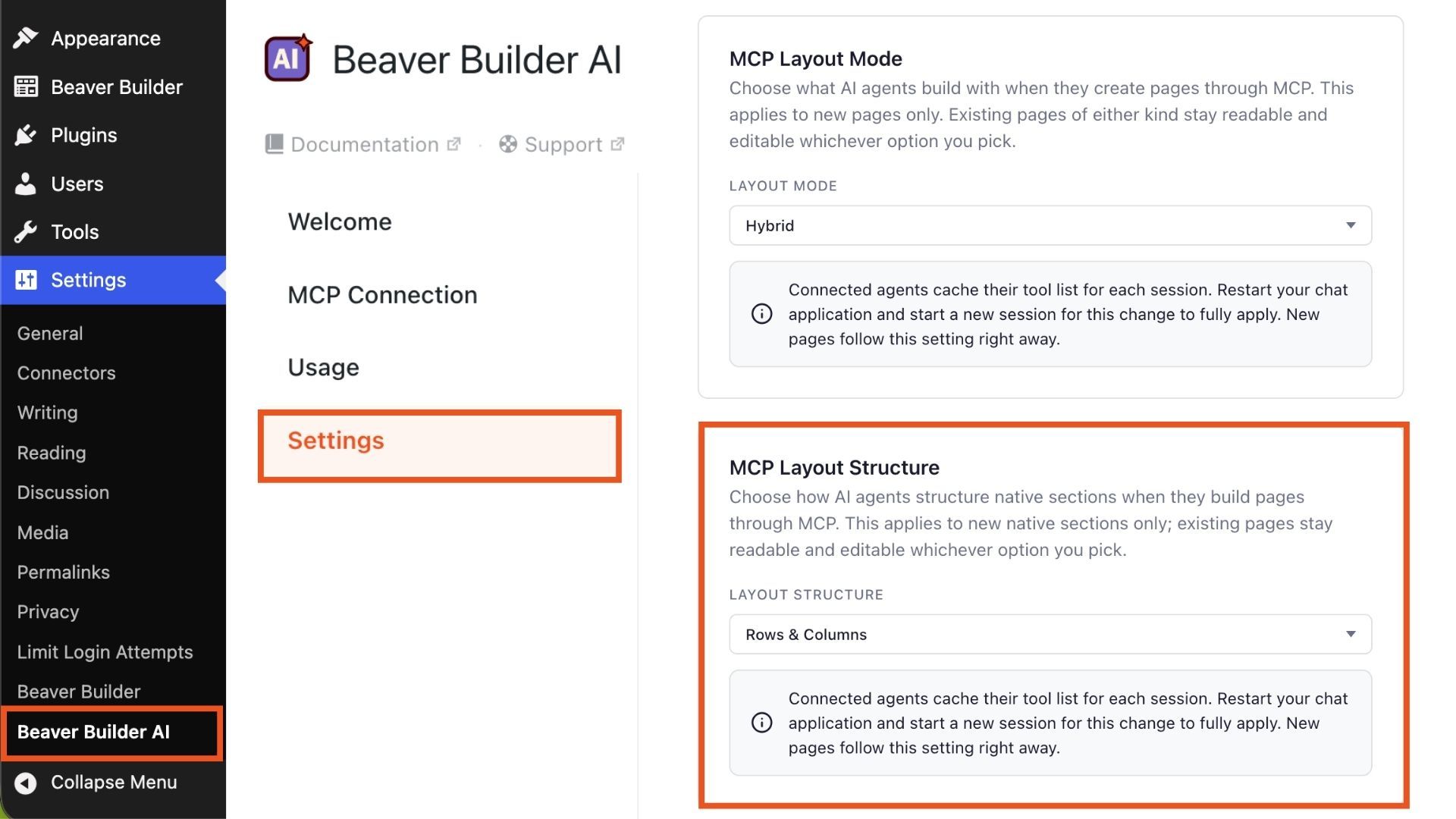
The setting is available in Beaver Builder AI → Settings. This gives you more control over the structure of pages created through connected AI clients.
If you prefer traditional Beaver Builder layouts with rows and columns, you can configure AI to use that structure. If you prefer the flexibility of Boxes, you can choose that instead.
Test Your Connection Before Troubleshooting
Having trouble connecting an AI client? Beaver Builder AI 1.0.1 adds a Test Connection tool that checks the connection directly from your WordPress site.
Go to Settings → Beaver Builder AI → MCP Connection and select Test Connection found by clicking Having trouble connecting?:
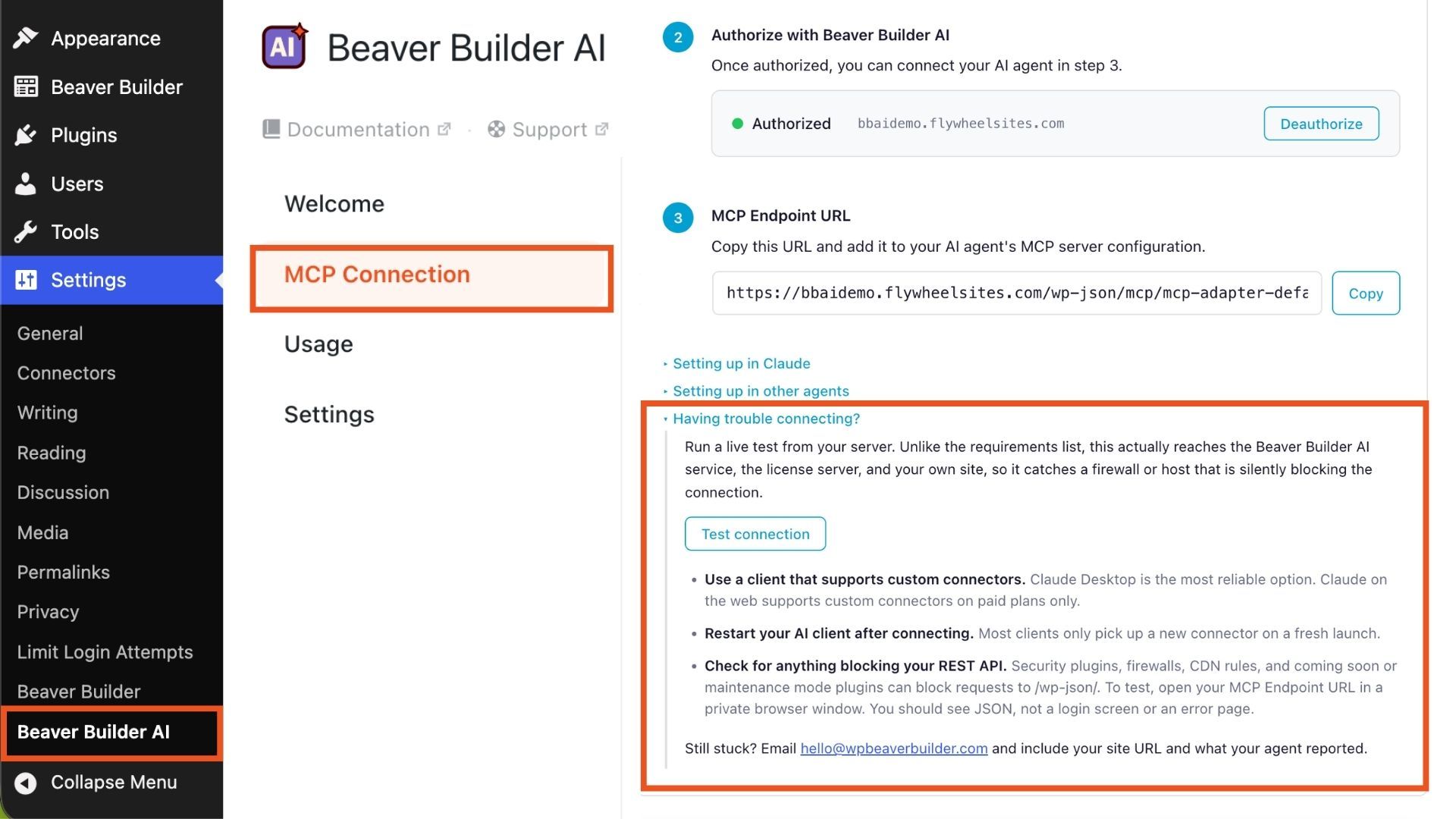
Unlike the requirements list, this is a live test that checks whether your server can reach the Beaver Builder AI service, license server, and your own site. It can help identify connection problems caused by firewalls, hosting restrictions, or other server-side issues.
The test also generates a report you can share with your hosting provider or Beaver Builder Support, making it easier to troubleshoot connection issues.
Better Connection Support for Hosts That Modify Requests
Beaver Builder AI 1.0.1 also includes host-specific connection instructions for environments such as WP Engine that strip the Authorization header from requests.
Previously, these situations could result in generic connection advice. Beaver Builder AI now provides instructions specific to the hosting environment when this issue is detected.
Other connection fixes address sites that block outbound connections, partially failed connections, and connections that could incorrectly appear to remain active after the plugin was deactivated or after 24 hours.
AI-Built Pages Get Automatic Contrast Corrections
AI-generated designs don’t always get every visual detail right. Beaver Builder AI 1.0.1 now automatically corrects low-contrast text and button colors on pages built by connected AI clients.
When a connected AI client builds or edits a page, Beaver Builder AI checks text and button colors against their backgrounds. If a color falls below a readable contrast threshold, it’s automatically adjusted before the page is saved. This helps prevent common accessibility and readability issues from making it into the finished page.
Design and Code Tabs Are Now On by Default
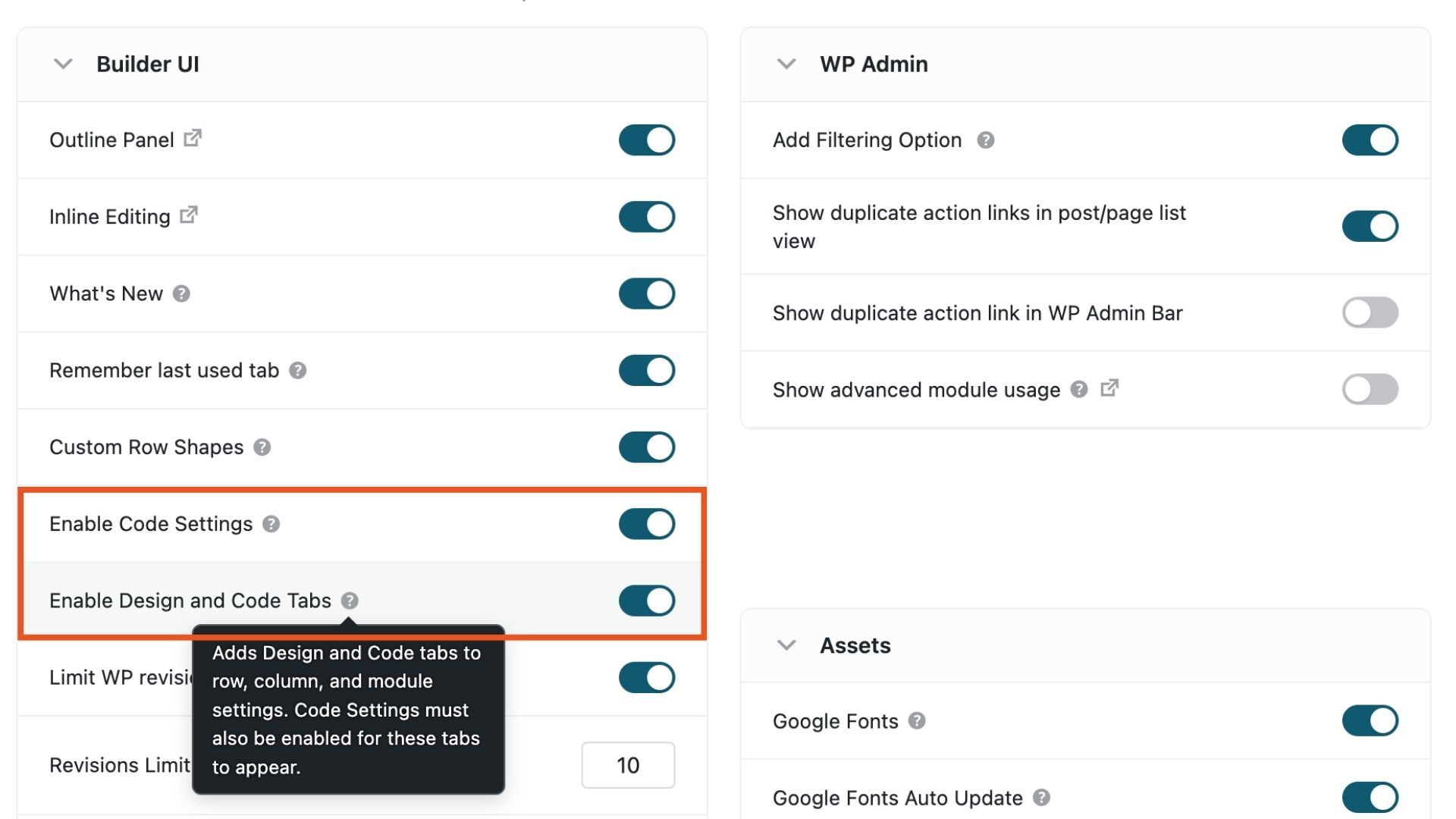
For fresh Beaver Builder installs, the Design and Code tabs are now enabled by default. This adds Design and Code tabs to row, column, and module settings out of the box.
Note that Code Settings must also be enabled for the Code tab’s fields to appear. That toggle lives above it, in Settings → Beaver Builder → Advanced. Once Code Settings is on, CSS and JS fields become available for rows, columns, and modules:
Existing Beaver Builder AI installations aren’t affected by this change.
Components Get Several Improvements
This release improves Beaver Builder Components, especially around converting Custom Modules into Components and working with instance overrides:
- Instance overrides are now sanitized like regular settings, and preserved when a Component is converted from a Custom Module
- Native modules converted from Custom Modules are no longer mistaken for Components, which could break Themer layouts
- A Component instance with no editable fields now shows Beaver Builder’s own notice with a link to add settings
- Clicking a Component’s own background with the Design tab open now selects the Component instead of jumping out of it
More Reliable Design Kit Imports
Beaver Builder AI 1.0.1 also fixes several issues with Design Kit imports. Icon fields inside nested repeaters now display the icon picker instead of raw SVG code. Repeaters with another element before them no longer lose their settings during import. The import instructions for headers and footers have also been corrected to better explain where that content is placed.
Better AI Editing for Native Beaver Builder Pages
Several fixes improve the experience when connected AI clients create or edit native Beaver Builder pages, covering responsive padding, form controls, headings, code placement, and other issues affecting native layouts.
Broken image links created by connected AI clients are now repaired using the same approach already used for pages created through the Beaver Builder AI chat workflow. Editing a media attachment no longer creates a duplicate that deletes the original file.
AI editing of saved global templates has also been fixed. Rewriting a template no longer causes pages using that template to appear blank, and pages using an edited global template now properly refresh their styles.
Staging and Themer Improvements
Beaver Builder AI 1.0.1 also includes a fix for staged sites using Themer.
When Themer routing rules are changed on a staged draft, those changes now correctly reach the live layout when the draft is published.
This helps keep staged and published layouts in sync when working with Themer routing.
Frequently Asked Questions
Beaver Builder AI 1.0.1 are a Layout Structure setting for choosing Rows/Columns vs. Boxes on AI-built native pages, a Test Connection panel for troubleshooting, automatic contrast corrections on AI-built pages, and Design/Code tabs enabled by default on fresh installs. The rest of the release is reliability and bug fixes across Components, Design Kit imports, and AI editing of native pages.
The MCP Layout Structure is a site-wide setting in Beaver Builder AI → Settings that controls whether connected AI clients build native sections using traditional Rows and Columns or the Box module.
Beaver Builder AI 1.0.1 detects hosts like WP Engine that strip the Authorization header and shows host-specific setup instructions automatically. If a connection still isn’t working, run the new Test Connection panel from the connection screen and share the resulting report with your host or Beaver Builder Support.
Beaver Builder AI 1.0.1 requires Beaver Builder 2.11 or later. Check wpbeaverbuilder.com/change-logs for the current Beaver Builder core version.
Update to Beaver Builder AI 1.0.1
Beaver Builder AI 1.0.1 is a maintenance release focused on improving the reliability of AI-connected workflows. It gives you more control over how AI builds native Beaver Builder layouts.
- Already using Beaver Builder AI? Update Now →
- New here? Try the Demo →

Start here

Beaver Builder AI Demo
Build a page with AI on a site that already has Beaver Builder and Beaver Themer installed. Free AI credits included.
Our Newsletter
Our newsletter is personally written and sent out about once a month. It's not the least bit annoying or spammy.
We promise.
Try Beaver Builder Today

Related articles

How to Turn a Screenshot Into a WordPress Page With AI
-
October 29, 2026
Have you ever had a client send you a screenshot and ask you to make their website look like it?…
Create a Dark Mode Toggle in WordPress
 -
October 15, 2026
-
October 15, 2026
Add a light and dark mode toggle to your WordPress site with Beaver Builder AI and the free Dark Mode…

How to Convert Base44 design to WordPress using Claude and Beaver Builder AI
 -
October 13, 2026
-
October 13, 2026
In this article, I share how I moved a landing page design from Base44 to WordPress using Claude and Beaver…
Join the community
We're here for you
There's a thriving community of builders and we'd love for you to join us. Come by and show off a project, network, or ask a question.


Since 2014
Ready to build?
The WordPress page builder agencies and freelancers have trusted since 2014. Now with AI.