
Features
Everything you need. Nothing you don’t.
A WordPress page builder that agencies and freelancers have shipped client work on since 2014.




Why Beaver Builder?
Why agencies stay.
"As a production site builder I really appreciate Beaver Builder. It’s extremely stable and crazy consistent version to version. The improvements tend to make sense. I’ve built at least 64 sites with BB." - David Innes, realbasics.com
Built for client work
This is a tool for people who hand finished sites to other people. Agencies, freelancers, and whoever inherits the site after you.Updates that don’t break client sites
We ship deliberately. When you push updates across a hundred client sites, nothing should move. That’s the whole point.Ship the page today
Build on the front end and see the result as you go. No preview tab, no guessing, no rebuild when the client changes their mind on Friday.Staging sites don’t count
Your plan’s site count covers production. Test an update on staging before it reaches a client site, at no cost to your license.Code your team can actually read
Documented, predictable markup. The developer who inherits this site in two years won’t have to reverse-engineer it.Plays well with others
Works with most WordPress themes and plugins. If yours is the exception, tell us and we’ll work with you until it does.No page builder tax
Lightweight output rather than layers of nested wrappers. Pages load fast, and they stay fast as the site grows.

Build Visually
Editor Features
"Beaver Builder is very user-friendly. Many features are available within the tool, giving you plenty of creative options on your website." - Erin M., Communications Director
Drag and drop, not layout code
Move a module and it moves. No shortcodes to hand-edit, no grid classes to remember, no rebuilding a row because one column changed.Beaver Builder AI
Describe a section and Beaver Builder AI builds it as a real module, not a code block, with its settings panel generated automatically. Edit it with the controls you already know, or open the HTML, CSS, and JavaScript when you need to go deeper. Included with Plus, Professional, and Unlimited.Modules you’d otherwise buy separately
Pricing tables, forms, galleries, sliders and more, included. No add-on plugin for every content type a client asks for. Most WordPress widgets drop in as modules too.Never start from a blank page
Start from a pre-built template and edit, or start from scratch. Either way you’re building, not configuring.Style it to match the comp
Typography, colors, spacing, backgrounds, gradients, shapes and icons. Entrance animations and visibility rules when the design calls for them.You won’t lose work
Changes autosave as you go. Draft privately, publish when it’s ready, and never wonder whether the live site is showing your experiment.
Since 2014
Beaver Builder Makes It Easy
Build Your Website In Minutes, Not Months
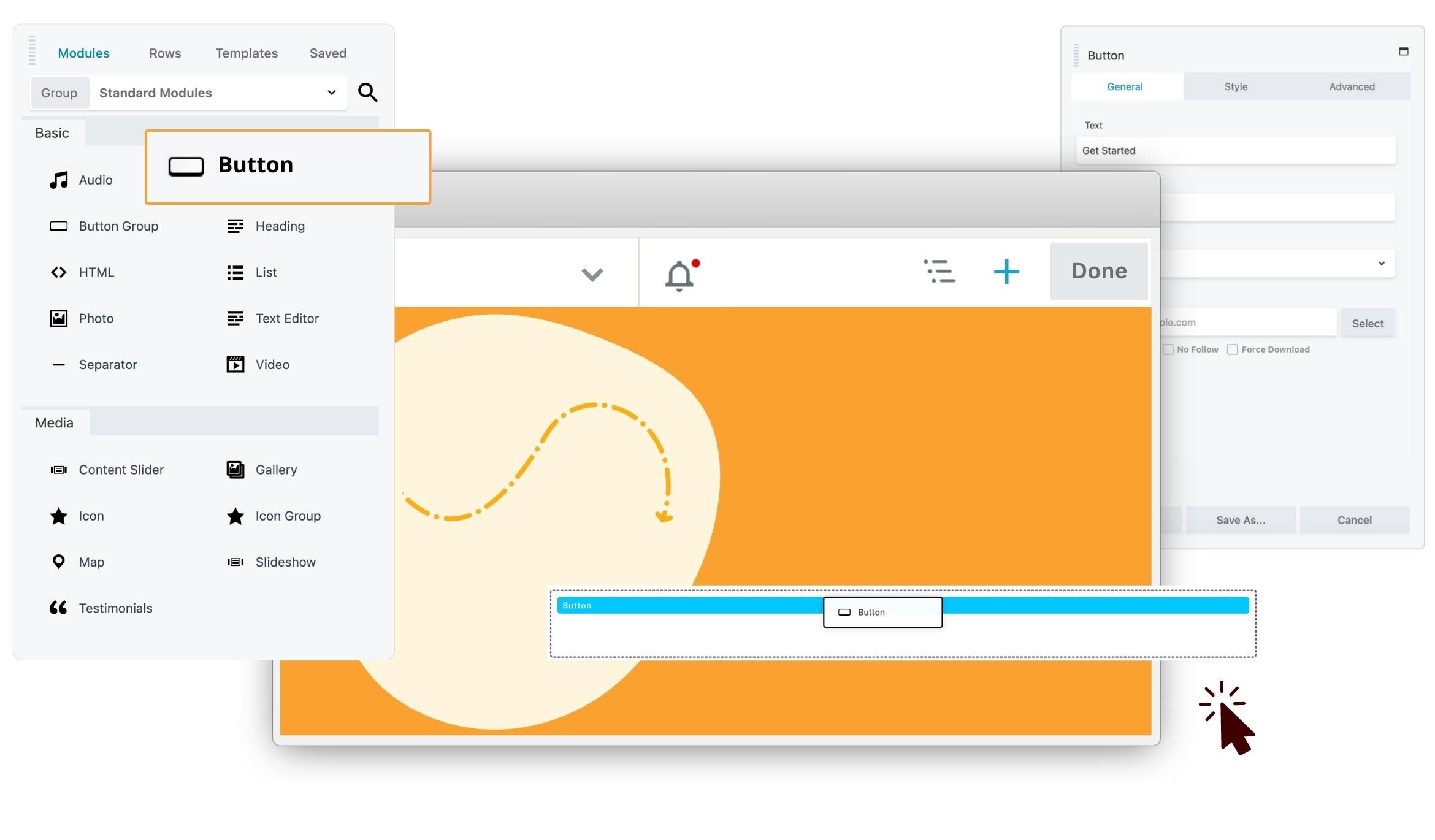
1 Choose a Beaver Builder Plan
Choose a plan that's right for you and install Beaver Builder on your WordPress site. Start with a pre-designed template or if you're feeling creative, you can build from scratch.
2 Drag and Drop Visual Design
Add your content and watch the page come together on the front end. What you see while building is what ships.
3 Click Done and Publish
Design your site faster and without the overwhelm. Extend functionality with easy to set up third-party integrations. You get more time to focus on growing your business.

Pixel Perfect
Responsive Design
"Beaver Builder with Themer and UABB has been our default arsenal for so many years now… Thanks for keeping BB as flexible, clean and rigid as you did." - r/beaverbuilder
Edit each breakpoint, don’t just preview it
Switch to tablet or mobile inside the editor and make real changes there. What you fix at that width stays fixed at that width.Breakpoints where your design needs them
Set the widths your design actually calls for. If the comp breaks at 900px, that’s where your breakpoint goes.Fix what small screens break
Reorder how columns stack, and show or hide elements per device, so the mobile layout reads the way you intended instead of the way the grid decided.

Create With Ease
Productivity Features
"I have a baby attached to me pretty much 24/7, so thankfully with Beaver Builder I could make my new website one-handed." - Erin Flynn, designbreadhq.com
Build it once, use it on every site
Save rows, modules, and whole layouts as templates, then reuse them on the next project. Export the set and import it into another site.Stop rebuilding the same page
Copy styles from one module to another, or duplicate an entire layout with its metadata in one click.Change it once, everywhere
Set row widths, spacing, breakpoints, and custom code globally, then override per element where a page needs something different.Find anything on a long page
The outline panel gives you the whole layout as a tree. Jump to a module, reorder a section, or duplicate a row without hunting for it.

Go Further
Developer Features
"Beaver Builder allows my team to build exceptional custom-designed WordPress sites for our clients...nothing compares to what we can do with it." - James Bullis, ventin.pro
Build your own modules
Extend an existing module or write a new one from scratch. A custom module behaves like a core one, with the same settings panel and the same editor behavior.MCP Connector
Connect Claude, Codex, Cursor, or another MCP-compatible agent directly to your WordPress site and work from the agent’s own interface. It builds native Beaver Builder rows, columns, modules, templates, and Themer layouts. You choose what gets published. Included with Plus, Professional, and Unlimited.Escape hatches where you need them
Add CSS or JavaScript per page or sitewide, and drop any Beaver Builder layout into another page with a shortcode.ACF Pro fields in both editors
Build configurable content once with ACF Pro and use it in Beaver Builder and Gutenberg. Useful when layout lives in one and post content in the other.Real WooCommerce stores, not product grids
With Beaver Themer you can lay out product pages, cart, checkout, and My Account, not just drop a products widget onto a page.Multisite Network Settings
Configure Beaver Builder once for your whole multisite network, then override per site where you need to. Included with Professional and Unlimited.White Labeling
Replace the Beaver Builder name and logo with your own, so the builder looks like part of your agency's toolkit. Your clients never need to know. Included with Unlimited.Accessible at the markup level
Keyboard navigation and color contrast on the authoring side, screen-reader attributes on the rendered page. We say basic because that is what it is.
Questions, answered.
No. Beaver Builder is built to stay backward compatible, so layouts you built years ago keep rendering the same way after an update. We ship deliberately for that reason: an agency updating fifty client sites at once cannot afford surprises.
Since 2014
Ready to build?
The WordPress page builder agencies and freelancers have trusted since 2014. Now with AI.