
What is Beaver Builder Cloud? Save & Reuse Templates Across WordPress Sites
 -
July 25, 2025
-
July 25, 2025
Last updated on March 12, 2026 by Jennifer Franklin
If you build multiple WordPress websites, whether for clients or your own projects, you’ve probably felt the friction of exporting and importing templates between sites; Beaver Builder Cloud eliminates that friction entirely.
What is Beaver Builder Cloud?
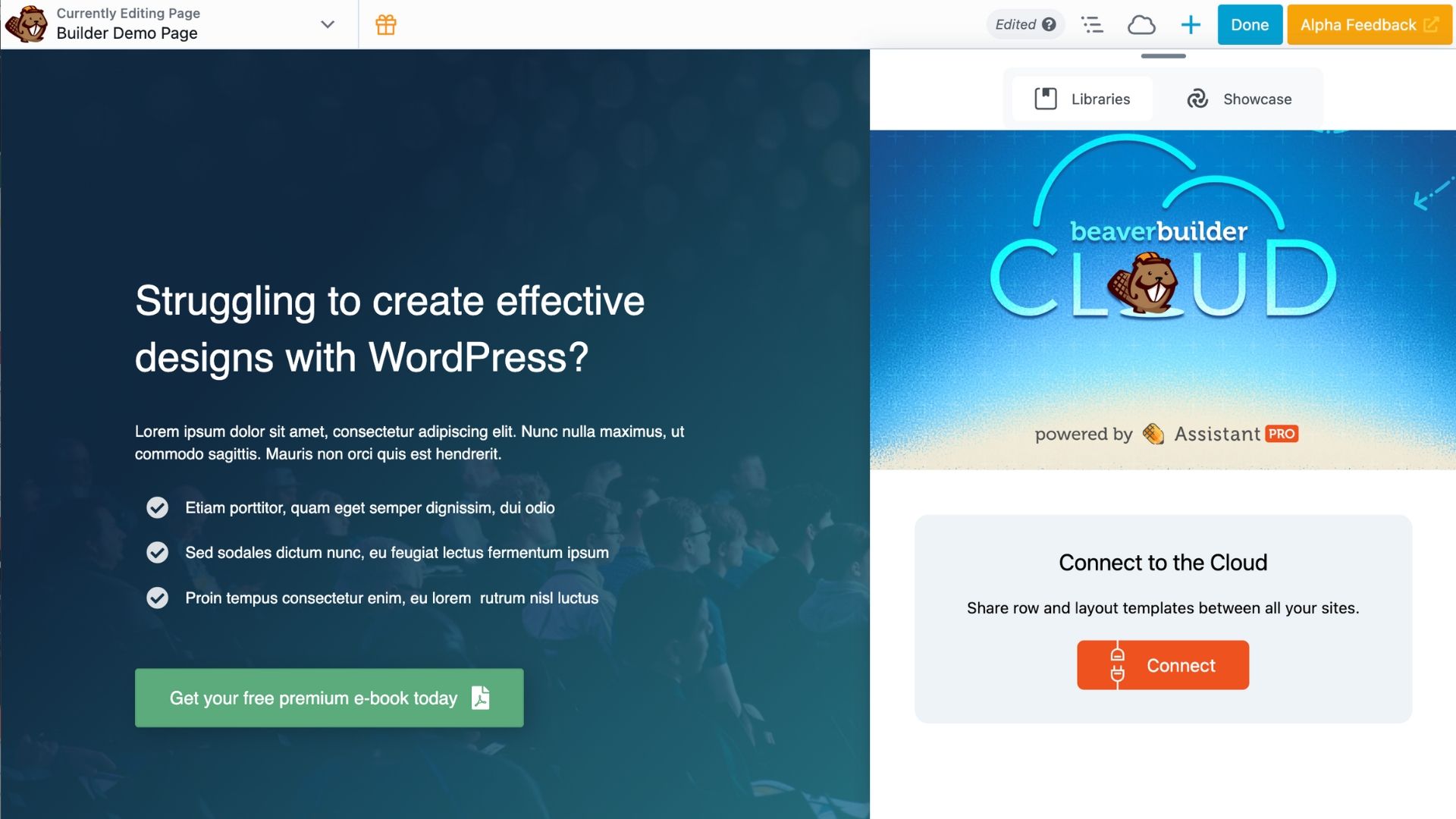
Beaver Builder Cloud is a built-in integration powered by Assistant Pro that lets you save, organize, and reuse templates across multiple WordPress sites directly from the Beaver Builder editor.
Instead of downloading and re-uploading template files every time you start a new project, you can store your layouts in the cloud and access them instantly from any site running Beaver Builder. No extra plugins required.
To open it, simply click the cloud icon in the upper-right corner of the Beaver Builder toolbar:
What You Can Do with Beaver Builder Cloud
Once connected, Beaver Builder Cloud gives you a centralized library for all your reusable design assets:
- Save templates to the Beaver Builder Cloud from the Beaver Builder UI
- Access your saved WordPress assets on any Beaver Builder site
- Easily reuse templates across multiple client projects without needing to export/import manually
- Import free and premium WordPress templates from by the Showcase library
How Beaver Builder Cloud Works
Using the new Beaver Builder Cloud integration is simple and fast:

- Open any page for editing in Beaver Builder.
- Click the cloud icon in the top-right corner of the Beaver Builder toolbar.
- Sign in or register to connect your Assistant Pro Cloud account.
- Start saving templates to the cloud or pull from your existing libraries.
Once you’re connected, your layouts follow you from site to site. Think of it as a personal design library that’s always within reach.
Two Ways to Connect to Assistant Pro
There are now two ways to connect Beaver Builder to Assistant Pro. This article covers the new built-in integration.
If you’ve been using the older method via the standalone Assistant plugin, you can read about the differences between the two options here: What is Assistant Pro? Two Easy Ways to Connect with Beaver Builder →
Library Limits on the Assistant Pro Free Plan Users
If you’re using the Assistant Pro Free Plan, there’s an important thing to know: free users can create one cloud library. If you already have more than one library, you’ll keep access to those existing libraries, but you won’t be able to create new ones without upgrading.
Upgrading to a Personal or Team plan unlocks unlimited libraries:
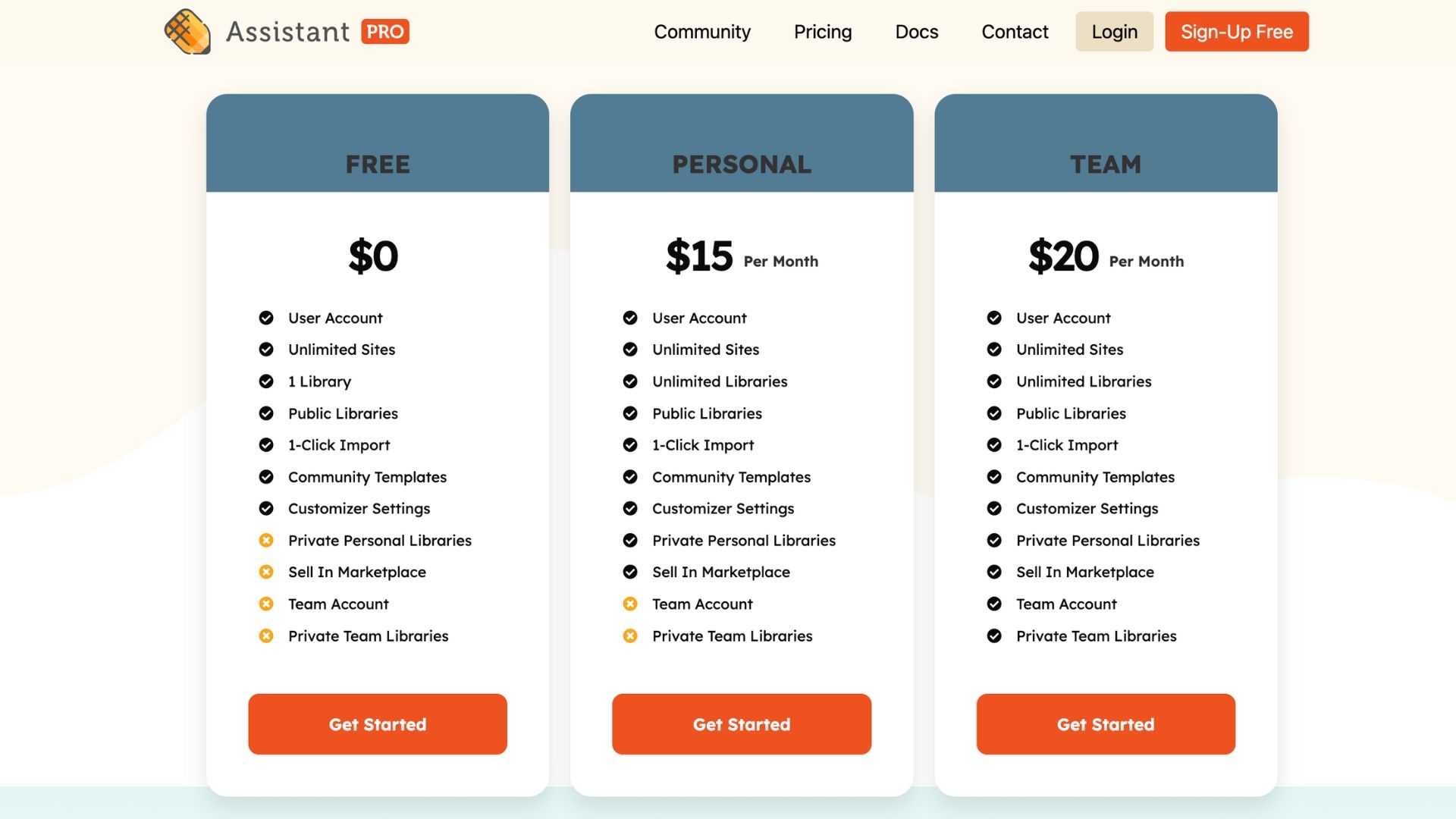
Premium users also have access to private libraries. Cick the lock icon or adjust the privacy settings within each library to control who can view and use it.
Note: This library limit is in effect immediately for all Assistant Free plan users.
How Beaver Builder Cloud Improves Your Workflow
For freelancers, agencies and developers managing multiple WordPress sites, Beaver Builder Cloud is a genuine workflow upgrade.
Instead of manually exporting and importing templates, you can store them in the cloud and access them instantly. You no longer need to:
- Download and upload template files
- Manage duplicate saved templates across multiple sites
- Rebuild common page layouts from scratch
Your best layouts live in the cloud and are always available when you need them.
What is Assistant and Assistant Pro?
If you’re new to Assistant, it’s a productivity plugin for WordPress that gives you quick access to content, media, templates, and more right from the frontend of your site. When you register an account with Assistant Pro, you also get cloud storage capabilities, making it easy to collaborate and manage assets across projects.
The Assistant Pro integration with Beaver Builder adds this same cloud access directly to the Beaver Builder UI, giving you the best of both worlds.
You might like to read this article: Assistant and Assistant Pro Cloud Introduction →

2 Comments
Our Newsletter
Our newsletter is personally written and sent out about once a month. It's not the least bit annoying or spammy.
We promise.
Try Beaver Builder Today

Related articles

Beaver Builder AI: Build WordPress Layouts with AI (Now in Alpha)
 -
June 10, 2026
-
June 10, 2026
Hey everyone! Big news. After a long time of building behind the scenes, Beaver Builder AI is here. The alpha…
How Beaver Builder Products Work Together to Build Flexible WordPress Websites
-
May 21, 2026
Building a WordPress website often means stitching together a theme from one developer, a page builder from another, and a…

From Azeroth to WordPress: How Warcraft Tavern Uses Beaver Builder
 -
May 19, 2026
-
May 19, 2026
Since releasing Beaver Builder 12 years ago, a feeling will come up from time to time that just never gets…
Join the community
We're here for you
There's a thriving community of builders and we'd love for you to join us. Come by and show off a project, network, or ask a question.


Since 2014
Build Your Website in Minutes, Not Months
Join Over 1 Million+ Websites Powered By Beaver Builder.
This might be handy during the dev process, but can it be disabled from the settings?
Great question! Yes, there is a User Access setting in Beaver Builder that allows you to disable Cloud access based on user role.