
Beaver Builder 2.11: Popup Module, Maintenance Mode, and Settings Snapshots
 -
July 7, 2026
-
July 7, 2026
Beaver Builder 2.11, also known as Kariba, is now available and delivers some exciting updates: a new Popup Module for building popups directly in the visual editor, built-in Maintenance Mode, Settings Snapshots for one-click backups and restores, expanded responsive controls, custom HTML attributes, accessibility improvements, and performance enhancements.
Beaver Themer 1.6 also ships alongside this release with a new Popup Layout type and expanded dynamic capabilities.
Let’s take a look at what’s new:
Table of Contents
- Build Popups Without Another Plugin
- Edit Page Settings Without Leaving the Builder
- New Beaver Builder Settings: Maintenance Mode & Snapshots
- More Control Over Responsive Design
- Beaver Builder Workflow and UI Improvements
- Better Tools for Designers and Developers
- Accessibility and Performance Updates
- What’s New in Beaver Themer 1.6
- Get Beaver Builder 2.11
Build Popups Without Another Plugin
The new Popup Module is a flexible container that allows you to create popups directly inside the visual builder.
For years, creating popups in WordPress meant installing a separate plugin, learning a second interface, and managing another layer of settings. With 2.11, popups are a native part of the Beaver Builder workflow:
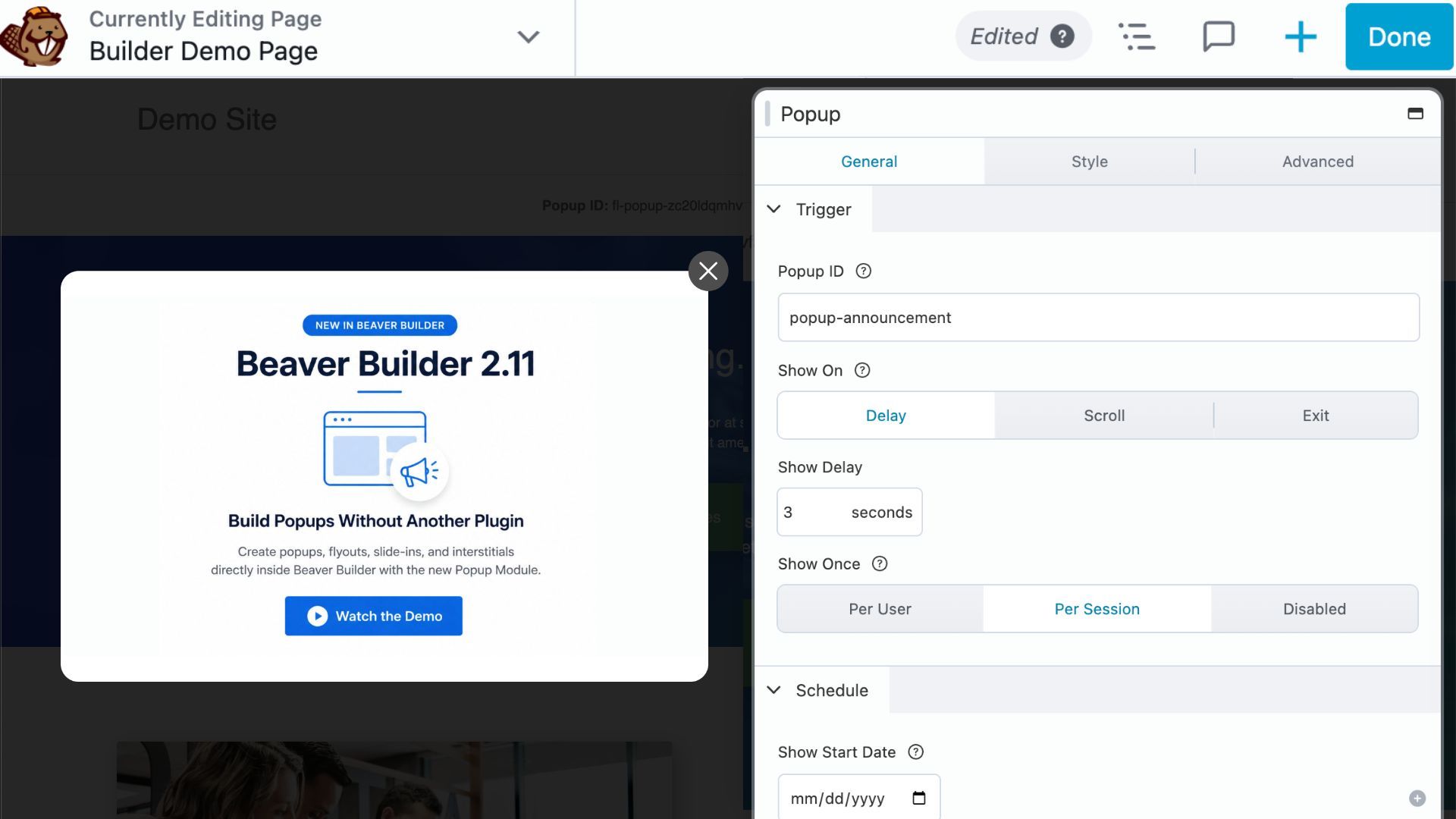
Because popups are built using the same modules and drag-and-drop interface you’re already familiar with, you can create announcements, lead generation forms, promotions, slide-ins, flyouts, and interstitials without leaving the page builder.
Popup Module features include:
- Layout selector icons to get started faster
- Navigation arrows within Loop Modules for dynamic popup experiences
- Scheduled rendering for date-range promotions, launches, and seasonal campaigns
With Beaver Themer 1.6 installed, popup functionality extends to the theme level. A new Popup Layout type lets you manage popups site-wide using Themer’s display rules and conditional logic, so you can control where and when they appear without duplicating work across individual pages.
Edit Page Settings Without Leaving the Builder
A new Post Type Settings tab has been added to Layout Settings (formerly Layout CSS & JavaScript), accessible from the Tools menu inside the builder. It gives you a way to edit key WordPress fields for the page or post you’re currently working:
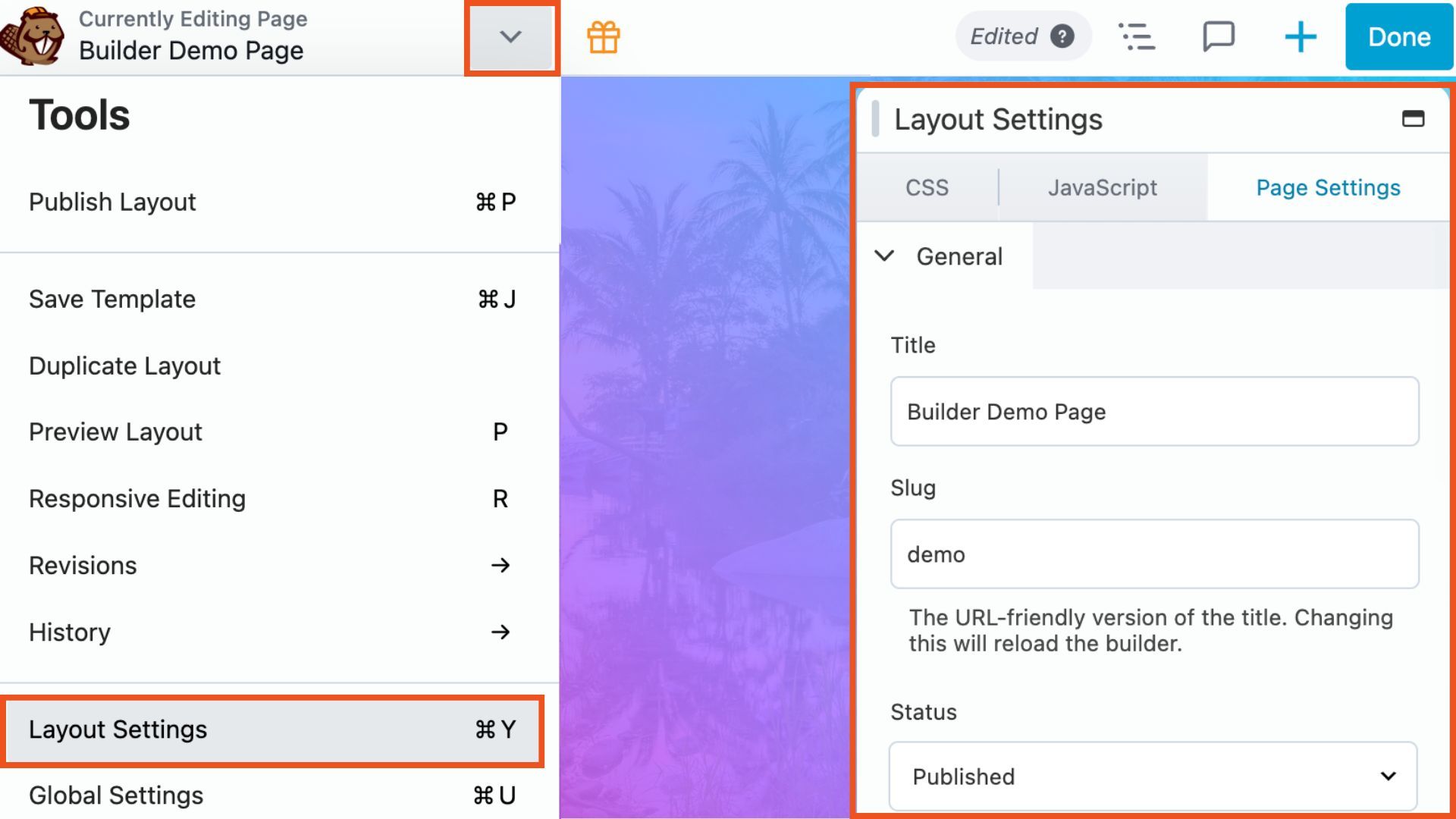
The tab name adapts to match the content type: Page Settings for pages, Post Settings for posts, Product Settings for WooCommerce products, and so on. Changes save directly to the WordPress post, not to Beaver Builder layout data.
For agencies managing client sites, this means fewer interruptions to your workflow. You can update things like page titles, featured images, and post statuses without leaving the builder.
New Beaver Builder Settings: Maintenance Mode & Snapshots
The Beaver Builder Settings page got a refresh in 2.11. Not only does it have a cleaner, more modern design, but it also introduces new settings snapshots for backups and a built-in maintenance mode for managing your site.
Settings Page Refresh
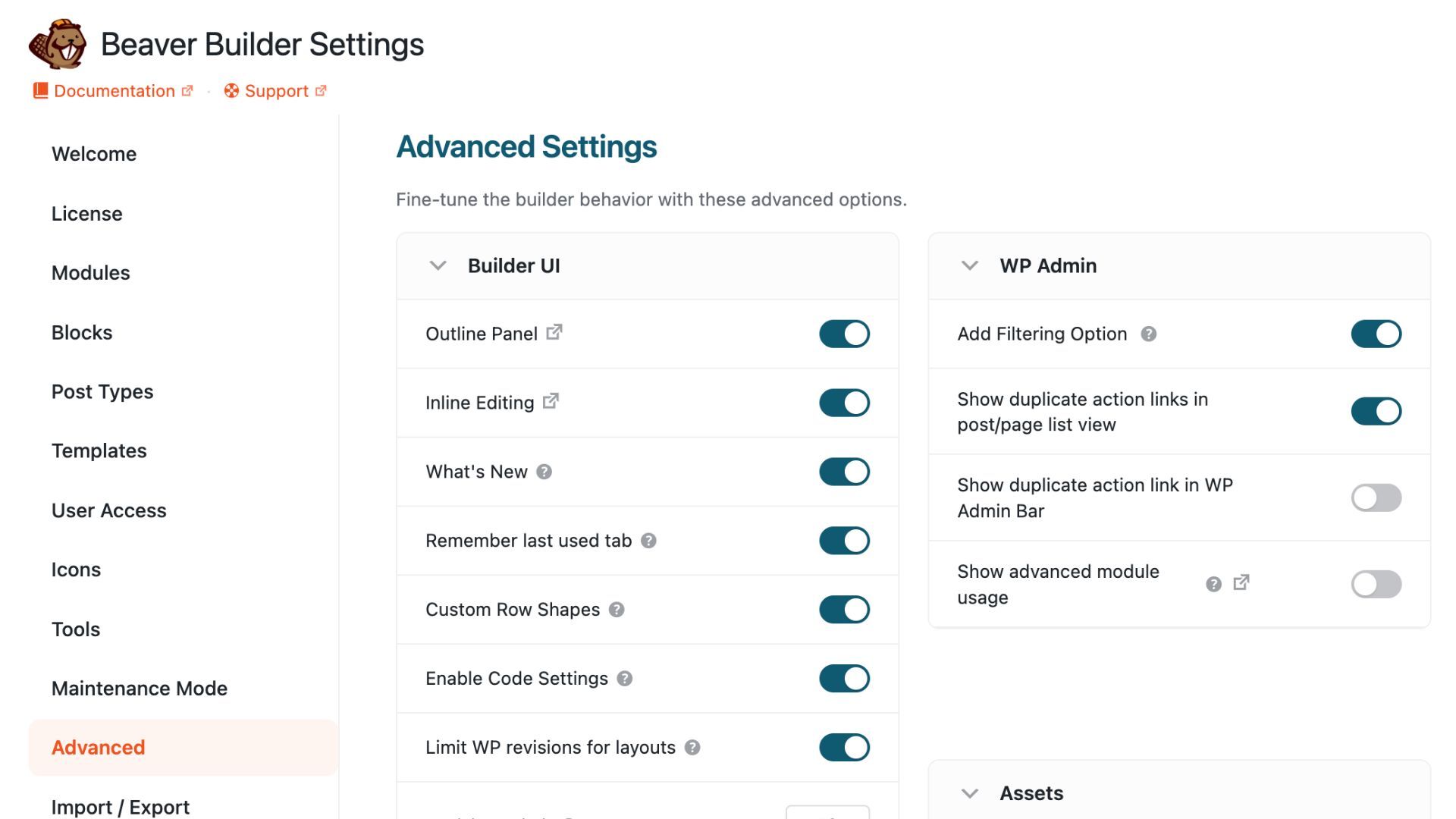
The Beaver Builder Settings page has been redesigned for clarity. Configuration options are easier to find, and the overall experience in the WordPress admin is cleaner and more focused:
Settings Snapshots
Settings Snapshots allow you to save and restore complete Beaver Builder configurations with a single click:
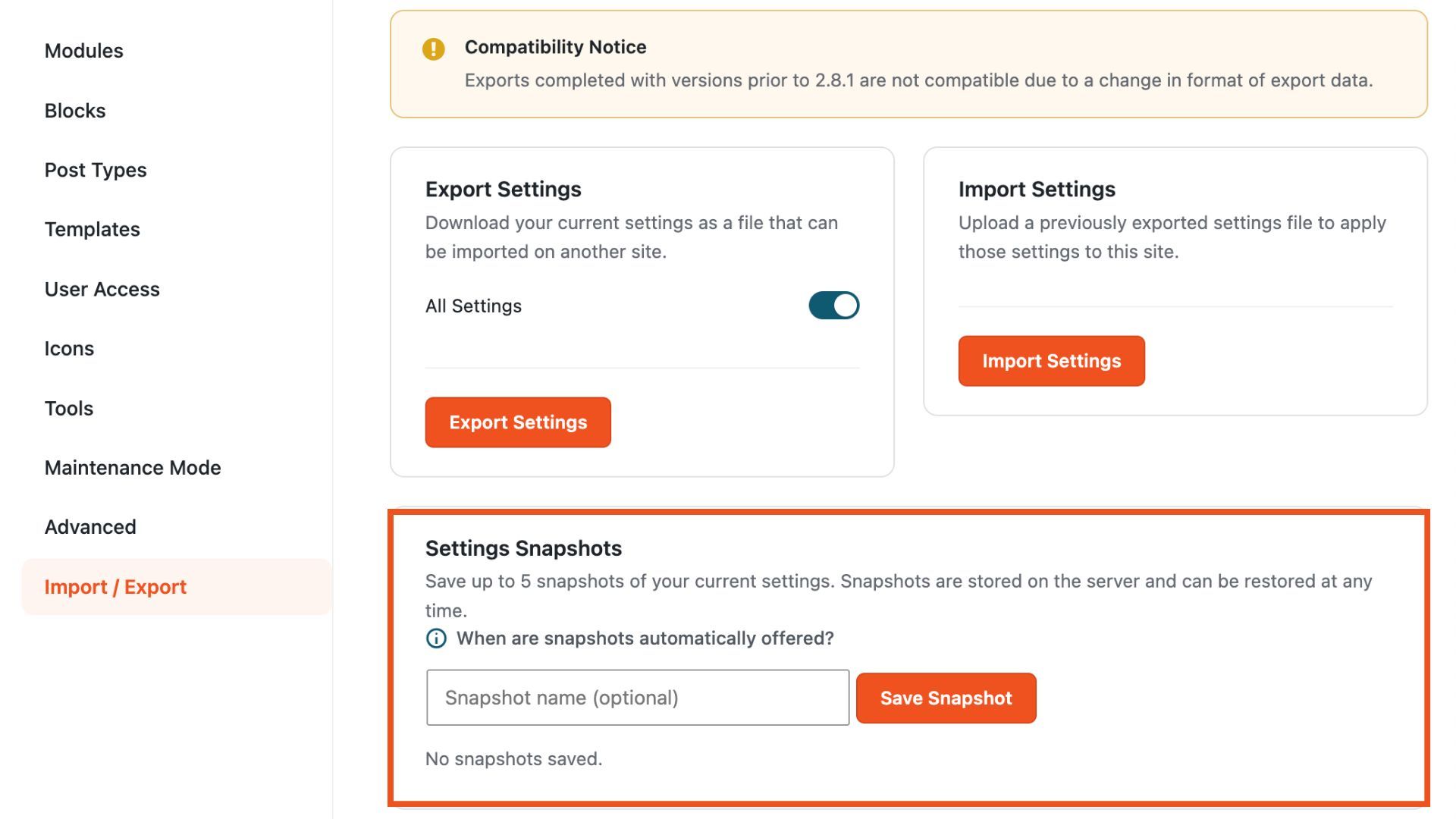
Available from the Import/Export section of the Settings page, you can store up to five named snapshots and restore any of them at any time. Before any import, restore, or reset action, the builder automatically prompts you to create a backup. For agencies, freelancers, and site managers, this is a safe way to experiment with configuration changes without risking a working setup.
Built-In Maintenance Mode
A native Maintenance Mode option is now available directly within the Beaver Builder settings. This allows you to enable a Maintenance or Coming Soon page without an additional plugin:
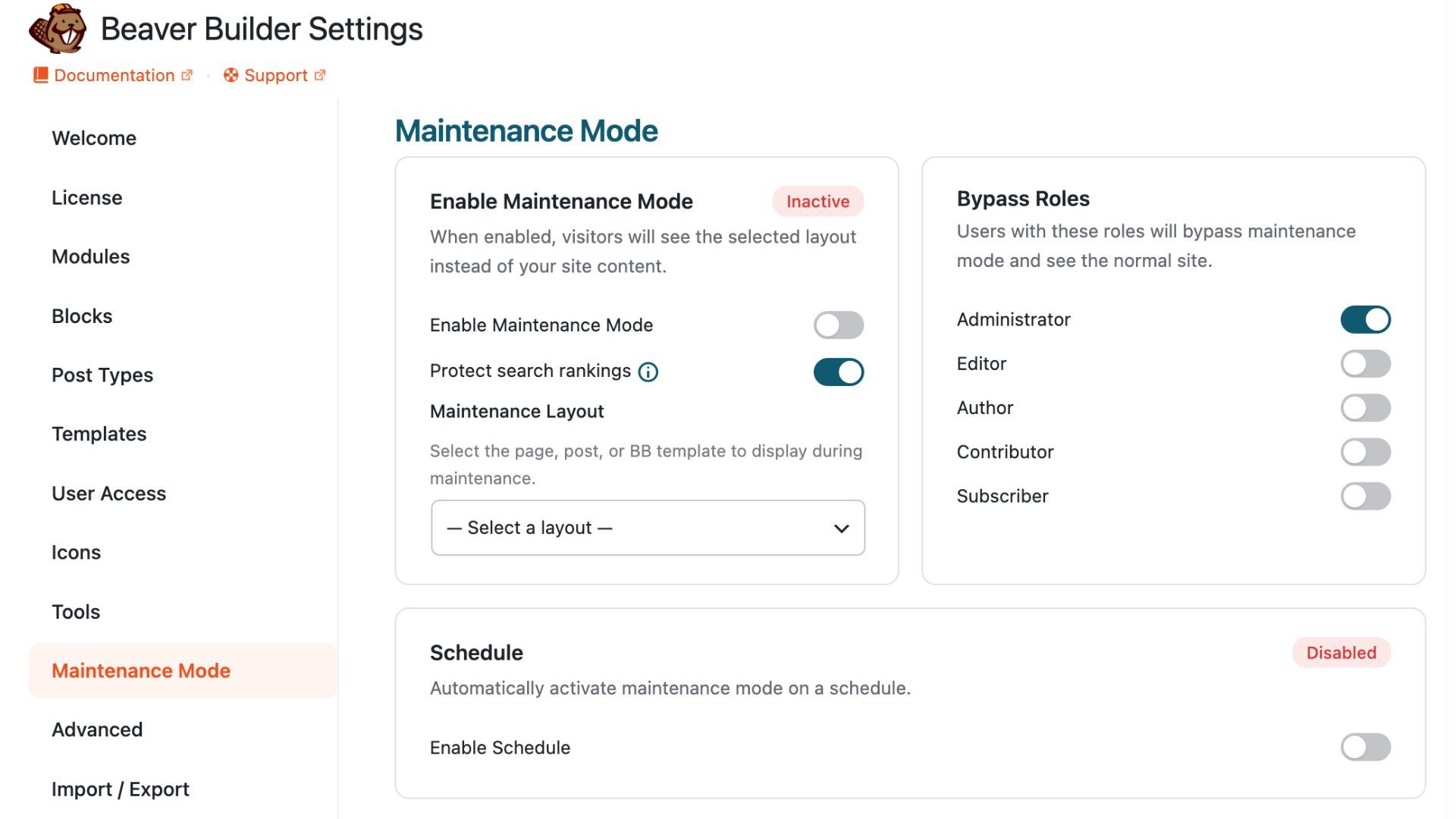
You can select the Beaver Builder layout to show visitors while you work, set which user roles bypass maintenance mode entirely, and schedule it for a specific time window. It also returns a 503 Service Unavailable status during active maintenance, which helps preserve search rankings while your site is temporarily unavailable.
More Control Over Responsive Design
Responsive design continues to be one of the most important parts of modern website building, and several elements received expanded responsive field support in this release. If you’ve been using custom CSS to handle breakpoint differences, a lot of that just got built in.
Button Group Module: Width, text color, background color, and border color are now all responsive. Useful when spacing and contrast need to behave differently on smaller screens.
Testimonials Module: A new typography field has been added, and text color and arrow color now support responsive values. You can also adjust testimonial styling across breakpoints directly within the module settings.
Rows: Text, headings, links, link hover states, backgrounds, and overlays are now responsive at the row level. Combined with existing column and module controls, this provides much more flexibility when designing responsive sections.
Icon Module: Spacing, icon colors, hover colors, and background styling are now responsive across breakpoints. For icon-heavy layouts such as service sections and feature grids, this makes it easier to optimize presentation on smaller devices.
List Module: Expanded responsive field support gives you greater control over list presentation across different screen sizes.
Slideshow Module: The Height field is now responsive, allowing you to create taller, more immersive slideshows on desktop while maintaining a more compact experience on mobile devices.
Beaver Builder Workflow and UI Improvements
Several updates in this release focus on making day-to-day editing faster and more intuitive.
Action Overlay Redesign
Action Overlays have been redesigned to improve both performance and usability:
Overlays have been moved out of the global layout markup and into individual elements. This structural change reduces styling conflicts and sets the foundation for future interface enhancements, including the new Design Panel planned for Beaver Builder 3.0.
On the canvas, editing feels more direct. Parent and child overlays are easier to access without constantly switching to the Outline Panel, especially when working with nested Box Module layouts and multi-layer designs. These improvements also extend to traditional rows and columns, where hover interactions are more consistent and predictable.
Outline Panel: Save As and Direct Export
The Outline Panel context menu now includes a Save As option. Simply, right click any item within the Outline Panel to access it:
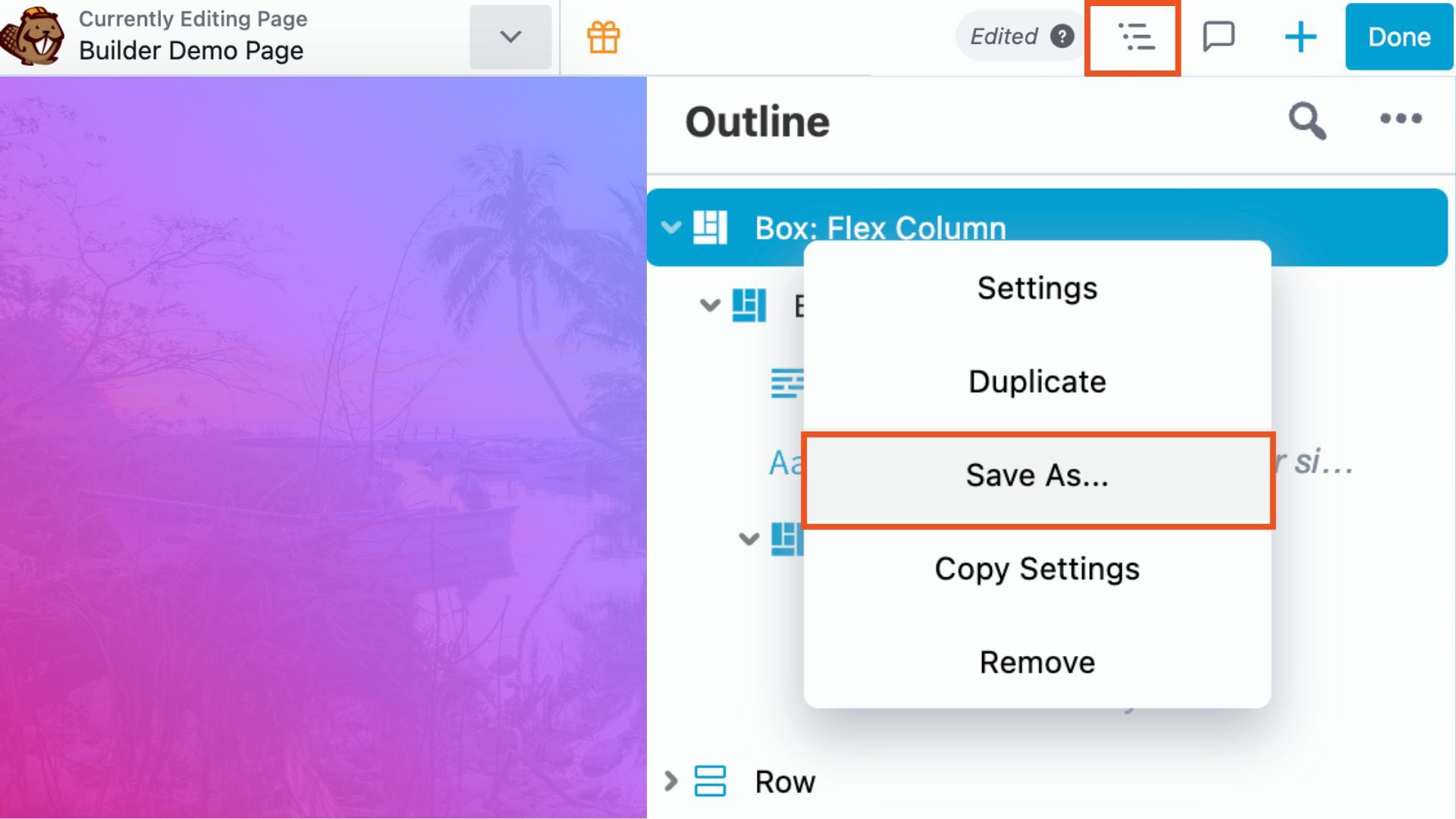
In addition, Globals and Components can be renamed and exported directly from the panel without interrupting your workflow.
Template Prepend Option
Templates now include a Prepend option that allows content to be inserted before existing layouts instead of replacing or appending to them:
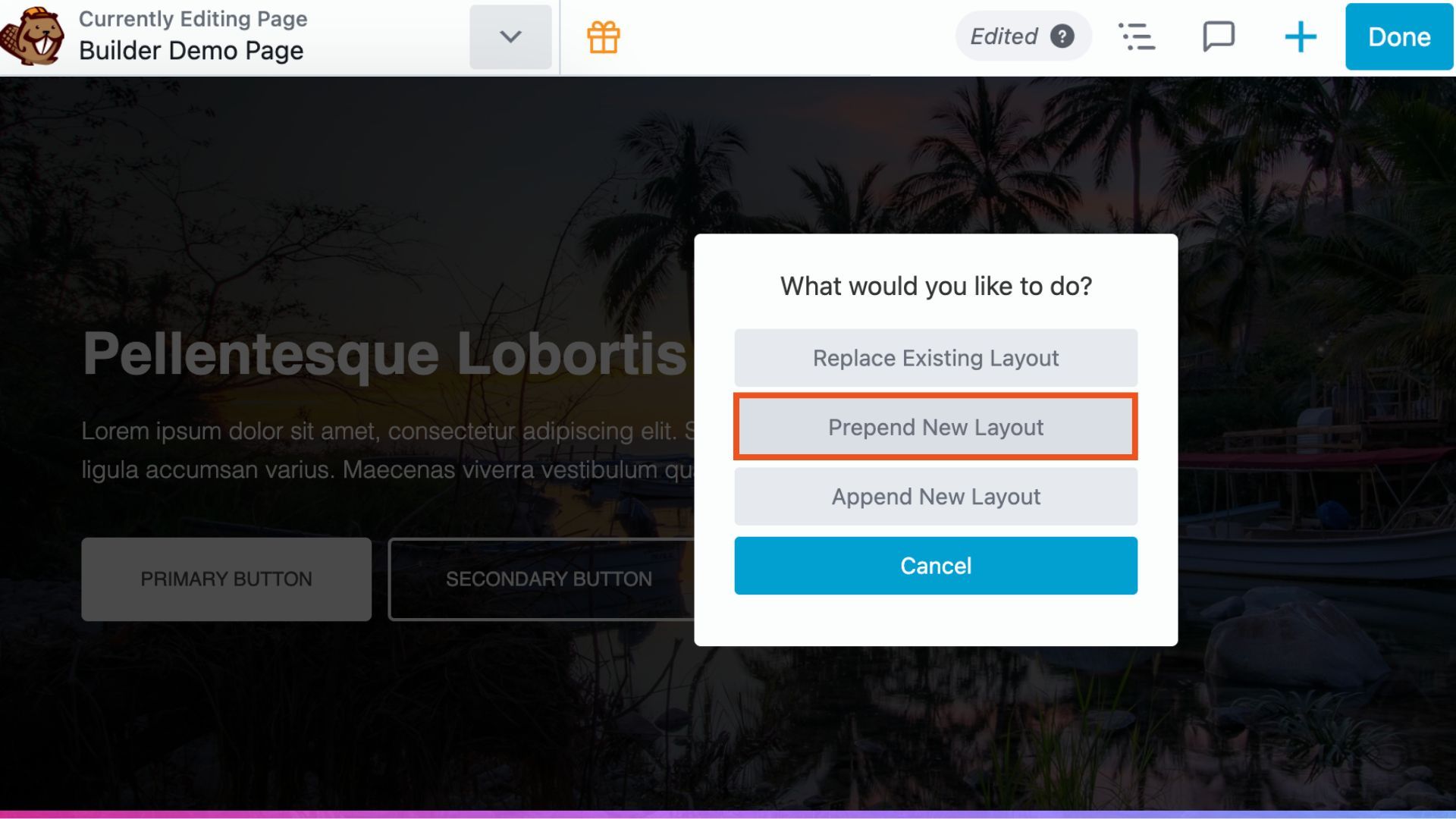
This makes it easier to build on top of existing designs without overwriting work that’s already in place.
Better Tools for Designers and Developers
Beaver Builder 2.11 also introduces several enhancements aimed at designers, developers, and advanced users.
Custom HTML Attributes on Every Node
Custom HTML attributes can now be added to rows, columns, and modules from the Advanced tab:
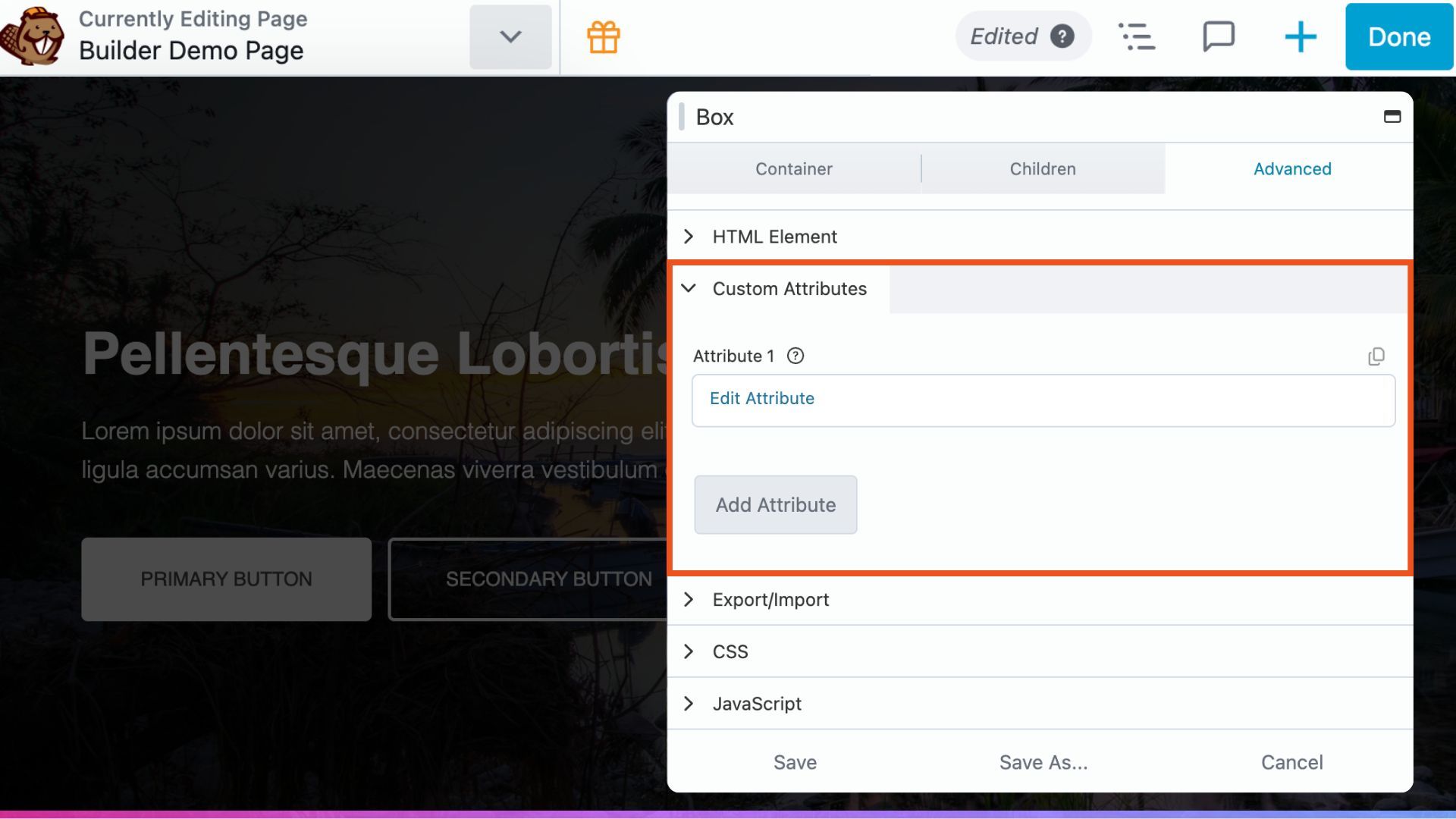
Apply attributes to the wrapper element or, for modules, target a specific inner element using a CSS selector. This makes it easier to add analytics tracking, JavaScript hooks, accessibility attributes, and custom integrations without modifying template files.
WordPress Font Library Support
Beaver Builder now supports the WordPress Font Library. Any font installed or uploaded through WordPress is available in Beaver Builder typography settings once it’s added to the library, across all modules that include typography controls.
FontAwesome 7.2 Support
Beaver Builder now supports FontAwesome 7.2, including Pro icon styles. The improved Extra Classes field across icon controls makes it easier to apply animations and consistent styling.
Color Picker Updates
The color picker now includes both grid and list views for saved color swatches:
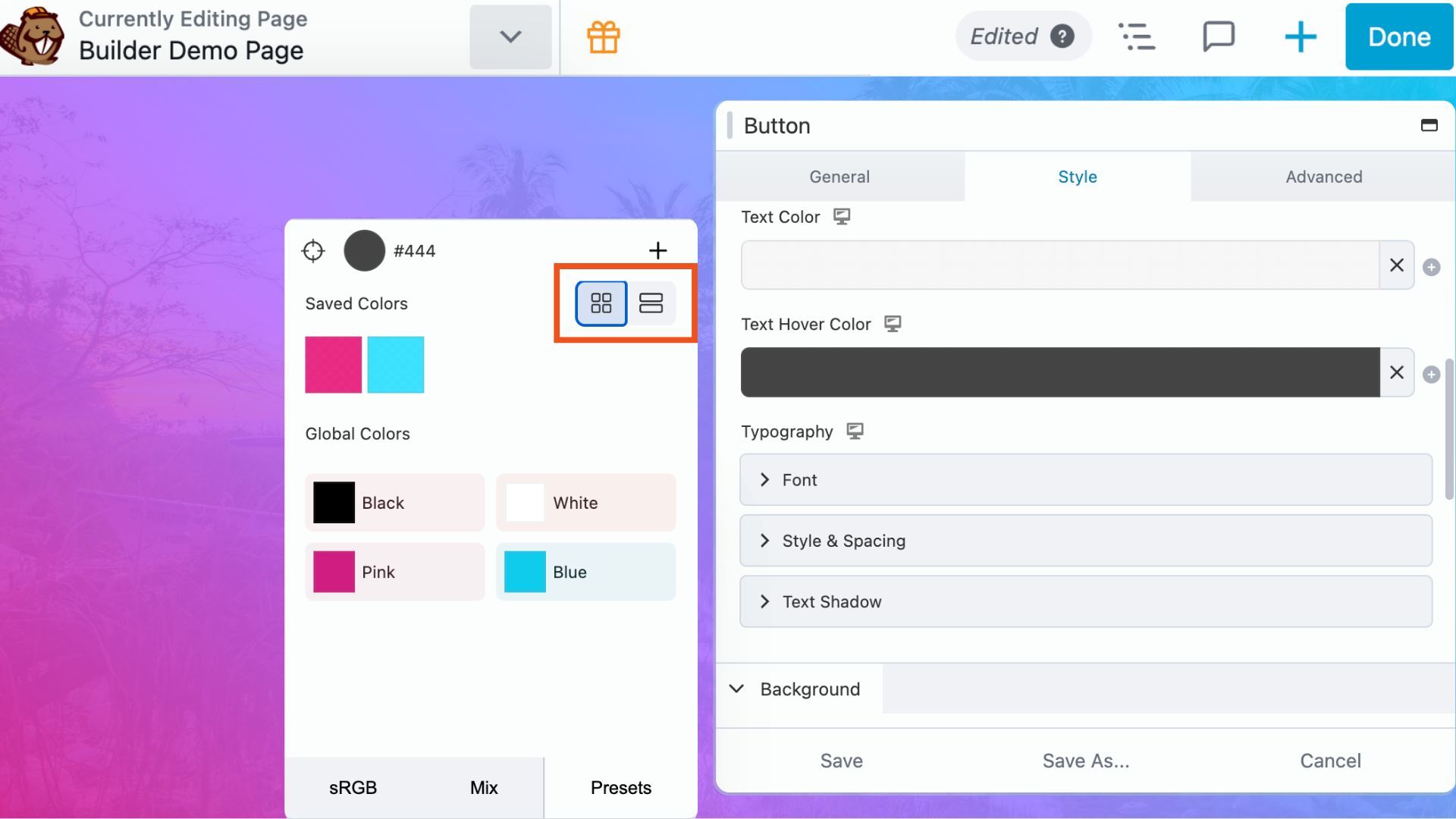
Whether you prefer browsing visually or reviewing colors in a structured list, you can switch between views based on your workflow and preference.
Field Connections: post_id Parameter
A new post_id parameter in field connections lets you pull content from a specific post rather than the current page or loop item. This makes it possible to display another post’s title, image, excerpt, or other connected field anywhere in your layout.
Field Connections: Icon Field Support
Field Connections now support Icon fields, expanding the dynamic content options available across your layouts.
Global Styles: Button Enhancements
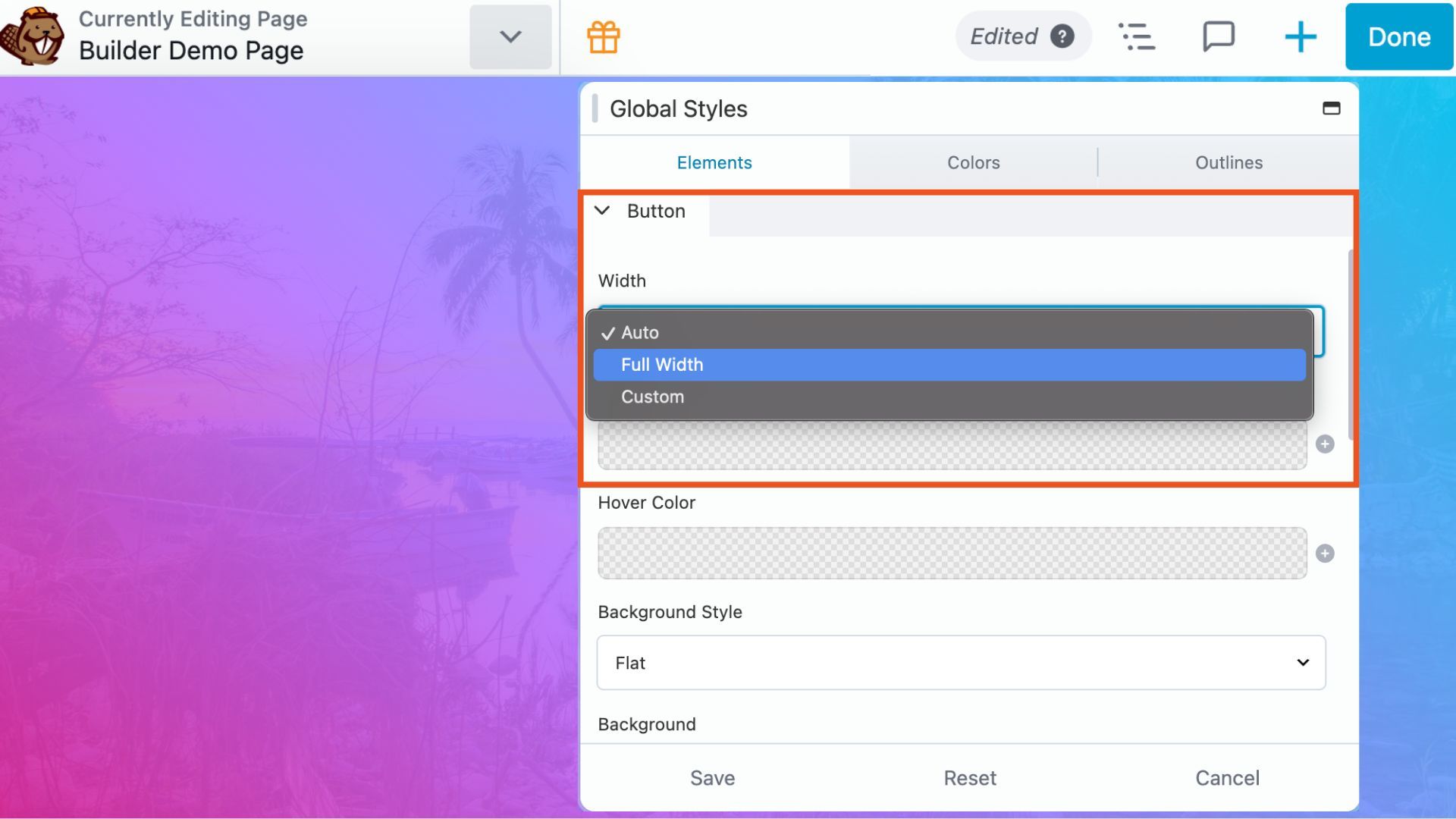
Global Styles now includes padding, gradient, and width options for buttons, giving you more control over your sitewide button styling without writing custom CSS:
Search Module: AJAX Post Type Filtering
The Search Module can now limit results by post type when displaying results via AJAX. If your site mixes post types and you want search results to stay focused, this gives you that control without custom code.
Pricing Table Module Improvements
The Pricing Table Module tooltip display can now be set to trigger on hover or click. Two additional tooltip styles have been added, along with separate URL support for dual billing scenarios like monthly and annual pricing plans.
Accessibility and Performance Updates
Some of the most important improvements in this release are the ones that happen behind the scenes.
Accessibility
Beaver Builder Accessibility has been improved across multiple modules. The Accordion Module now includes better semantic markup and ARIA support. The Search Module introduces a new Reveal layout with built-in accessibility considerations. Global Styles now includes focus outline controls, helping maintain accessibility without limiting design flexibility. In addition, links that open in new tabs now include screen reader notifications to improve clarity for assistive technology users.
Performance
Performance improvements are also woven throughout the update. Database queries have been reduced, object cloning optimized, and builder initialization made faster. A new filter helps remove orphaned nodes during save operations, resulting in cleaner and more efficient layouts over time. Plus, translations are now served from translate.wpbeaverbuilder.com for improved performance.
What’s New in Beaver Themer 1.6
Beaver Themer 1.6 launches alongside Beaver Builder 2.11, bringing new flexibility for dynamic content, theme layouts, and site-wide customization.
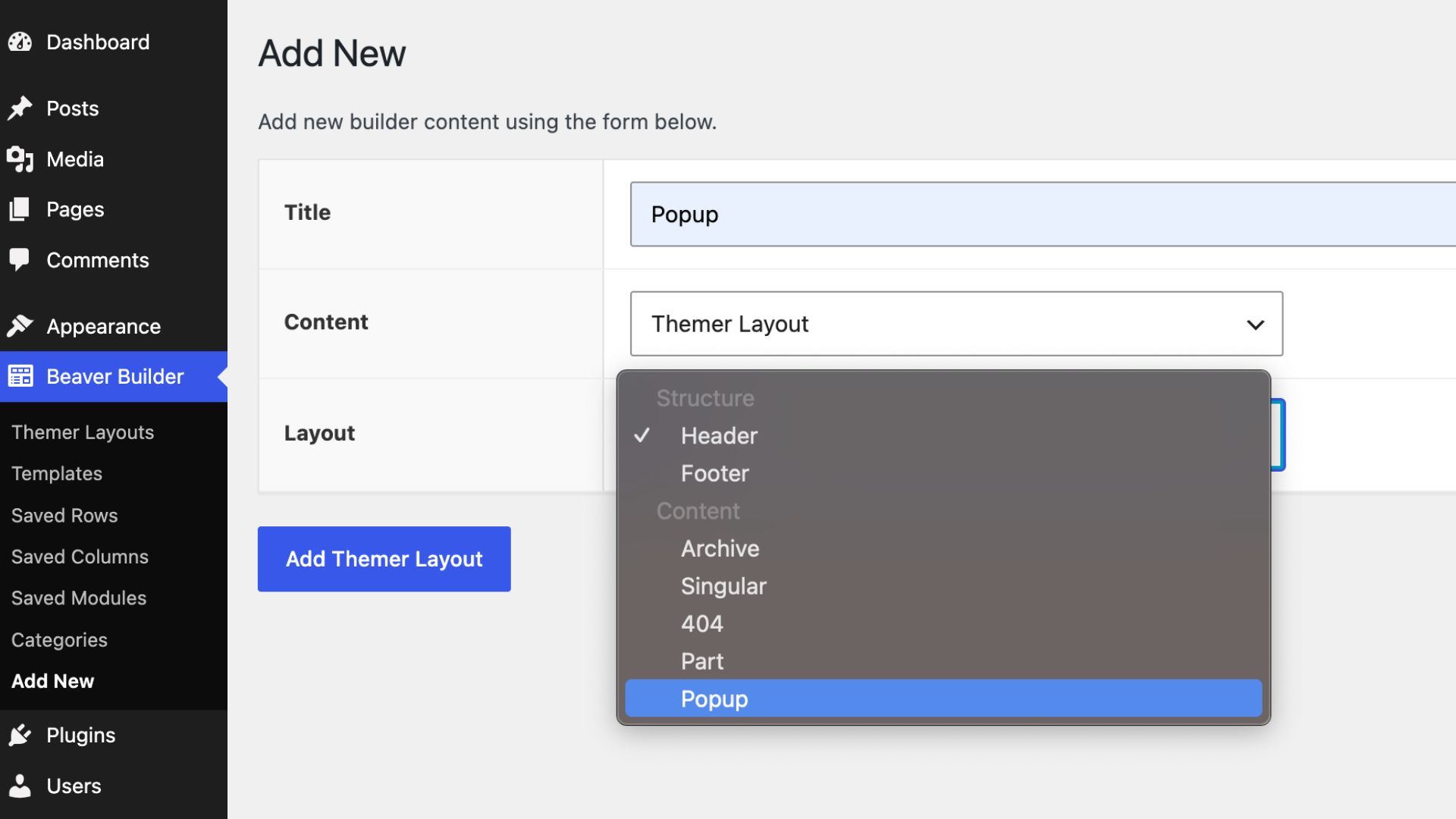
Popup Layouts: The new Popup Layout type lets you manage popups at the theme level using Themer’s display rules and conditional logic:
Editable Layout Types: Themer layout type is now editable after creation. Change a header to a footer, for example, without rebuilding from scratch.
Themer Modules for All Layout Types: Themer modules are now available across all layout types, making it easier to add dynamic content throughout your site regardless of the layout you’re building.
Loop Module Popup Preset: The Loop module now includes a Popup preset, giving you a fast starting point for building dynamic popup layouts.
ACF Icon Picker Support: Field Connections now support Advanced Custom Fields icon picker fields, expanding the dynamic content options available to developers and site builders.
WooCommerce: Separate Price Field Connections: WooCommerce users can now connect regular prices and sale prices independently, providing more flexibility when building custom product layouts.
New site:date Shortcode: A new site:date shortcode makes it easy to display dynamic dates anywhere on your site.
Get Beaver Builder 2.11
Both Beaver Builder 2.11 and Beaver Themer 1.6 are available now. Update from your My Account page.
The full changelog is available on the Change Logs page.
Resources:
- Official Beaver Builder Support
- Beaver Builder Documentation
- YouTube Tutorials and Online Courses
- Beaver Builder Community Facebook Group
Which feature in Beaver Builder 2.11 are you most excited to use? Let us know in the comments.

Start here

Beaver Builder AI Demo
Build a page with AI on a site that already has Beaver Builder and Beaver Themer installed. Free AI credits included.
3 Comments
Our Newsletter
Our newsletter is personally written and sent out about once a month. It's not the least bit annoying or spammy.
We promise.
Try Beaver Builder Today

Related articles

How to Build an Editable WordPress Header and Footer With AI
-
October 2, 2026
Headers and footers are among the most repetitive parts of building a WordPress website. AI can speed up the process,…

How to Convert a ChatGPT Site to WordPress (Beaver Builder AI)
 -
October 1, 2026
-
October 1, 2026
Hey everyone! If you’ve built a website design in ChatGPT, you’ve probably wondered how to get your ChatGPT site to…

Beaver Builder AI MCP Settings: Layout Mode and Layout Structure Explained
-
September 23, 2026
Beaver Builder AI has two MCP settings that shape AI-built pages. MCP Layout Mode controls what AI builds with: Native…
Join the community
We're here for you
There's a thriving community of builders and we'd love for you to join us. Come by and show off a project, network, or ask a question.


Since 2014
Ready to build?
The WordPress page builder agencies and freelancers have trusted since 2014. Now with AI.
Where si the documentation about the “Custom HTML Attributes”?
You can find more info on that feature here: https://docs.wpbeaverbuilder.com/beaver-builder/layouts/advanced-tab/custom-attributes
Amazing. Thank you so much. I love that you are still pushing the best thoughtful updates to your product. everything is AI this and and that, but this is what we want, clean simplistic building tools that we can easily control.