

What’s New in Assistant PRO: Smarter Imports, Settings Sync, and Dashboard Notifications
 -
February 25, 2026
-
February 25, 2026
If you’ve been using Assistant PRO to manage WordPress libraries and site configurations, you already know how much time it can save. But if you’ve ever felt like certain parts of the workflow were still a bit clunky, like having to manually export settings, add them to a library, then download and re-import them elsewhere, you’re going to love what’s coming next.
We’ve shipped two major improvements to the Assistant plugin in version 1.5.4, plus a new notification feature for the Assistant Pro dashboard. Together, these updates are designed to reduce friction, minimize manual steps, and give you more control over exactly what gets imported and where.
Here’s a full breakdown of what’s new and why it matters for your workflow:
1. Settings Are Now Fully Integrated into Libraries
Let’s start with one of the biggest pain points we’ve heard from users who manage multiple WordPress sites: dealing with Beaver Builder settings across builds.
The Old Way: Manual Export and Import
Previously, if you wanted to store your Beaver Builder settings in a library and apply them to another site, you had to go through a pretty tedious manual process:
- Export your settings from the current site
- Manually upload that export file to your library
- Later, when setting up a new site, download the settings file from the library
- Manually import it into the new site
Every one of those steps was an opportunity to eat up time you didn’t have. And when you’re spinning up multiple client sites, this kind of repetitive overhead adds up fast.
The New Way: Add Settings Directly from the Library Panel
That manual process is now fully replaced by native integration inside Assistant.
When you go to add content to a library, you’ll now see expanded Settings options directly in the panel:
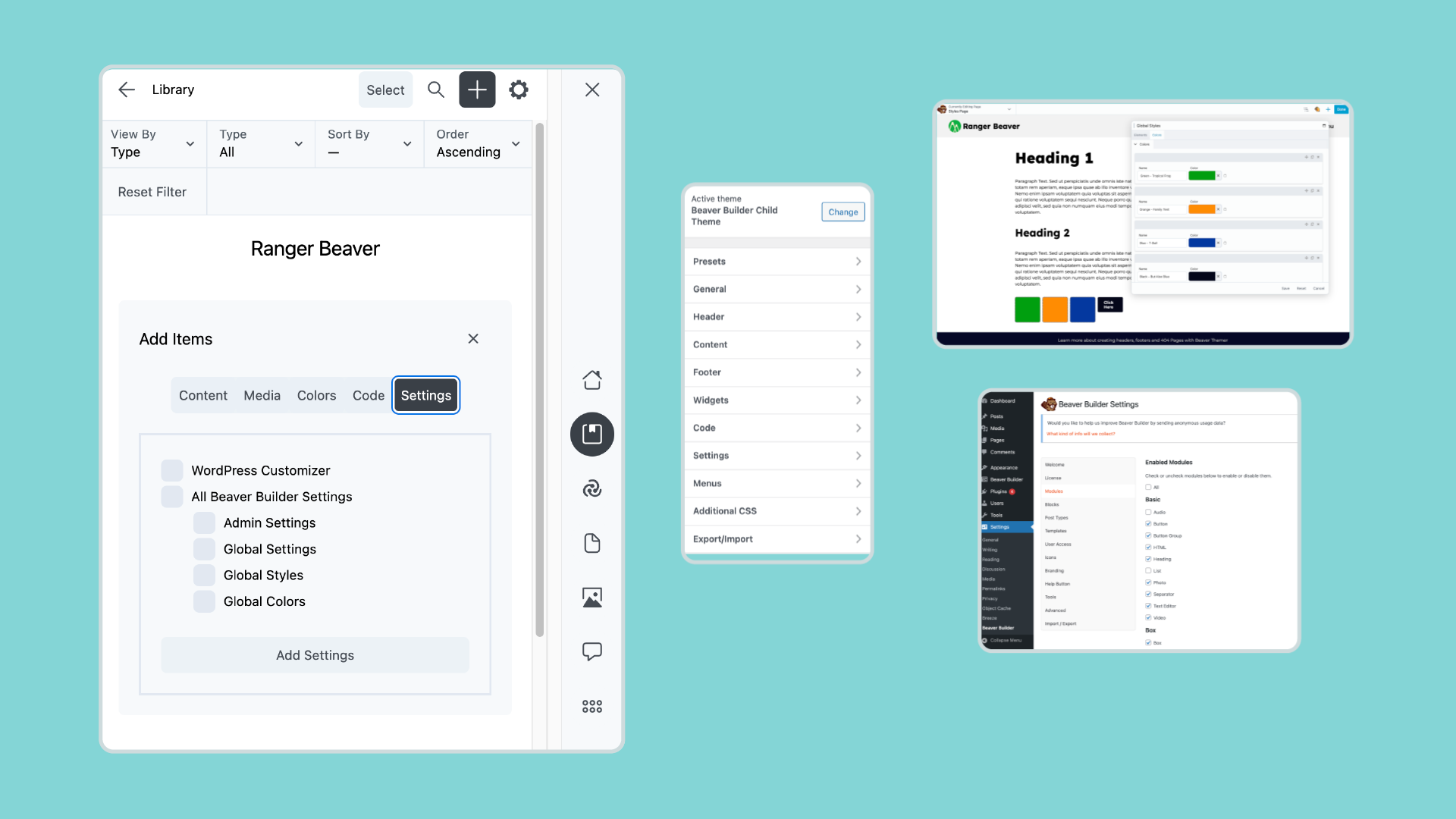
Instead of only being able to add WordPress Customizer settings (which was all the old version supported), you can now choose from multiple setting types:
- WordPress Theme Customizer settings — your standard WordPress theme customizations
- Beaver Builder Admin settings — including enabled/disabled modules, global styles, and post type configurations
- Beaver Builder Global Settings — site-wide builder defaults such as responsive breakpoints, row and module defaults, and overall layout behavior
- Beaver Builder Global Styles — saved global typography, spacing, and styling rules that maintain visual consistency across your site
- Beaver Builder Global Colors — your saved color presets used throughout modules, rows, and templates
- Or any combination of the above — mix and match based on what you need in a given library
This makes it incredibly easy to standardize configurations across multiple builds without juggling export files, resulting in faster setup, fewer mistakes, and more consistent site configurations.
Apply Settings Directly to Any Site
Once your settings are saved to a library, applying them to a new site is equally straightforward. Navigate to your library, choose the settings you want to apply, click Apply Settings, confirm the action, and Assistant handles the rest.
What gets updated? Everything that you selected such as:
- Which modules are enabled or disabled
- Global style settings
- Global colors
- Post type configurations
- Other Beaver Builder-related preferences
This is a game-changer if you’re an agency or freelancer who builds sites on a template or starter configuration. Instead of manually replicating your preferred setup on each new project, you configure it once, save it to a library, and apply it to the new site in seconds.
2. Smarter, More Selective Library Imports
The second major update changes how you import a library onto a site.
From All-or-Nothing to Pick-and-Choose
Previously, importing a library was either import everything, or don’t. That’s fine when you want the full package, but it creates problems when a library contains a mix of content types and you only need part of it.
Now, when you go to import a library onto a site, you’ll see selectable options that let you choose exactly what to bring in:
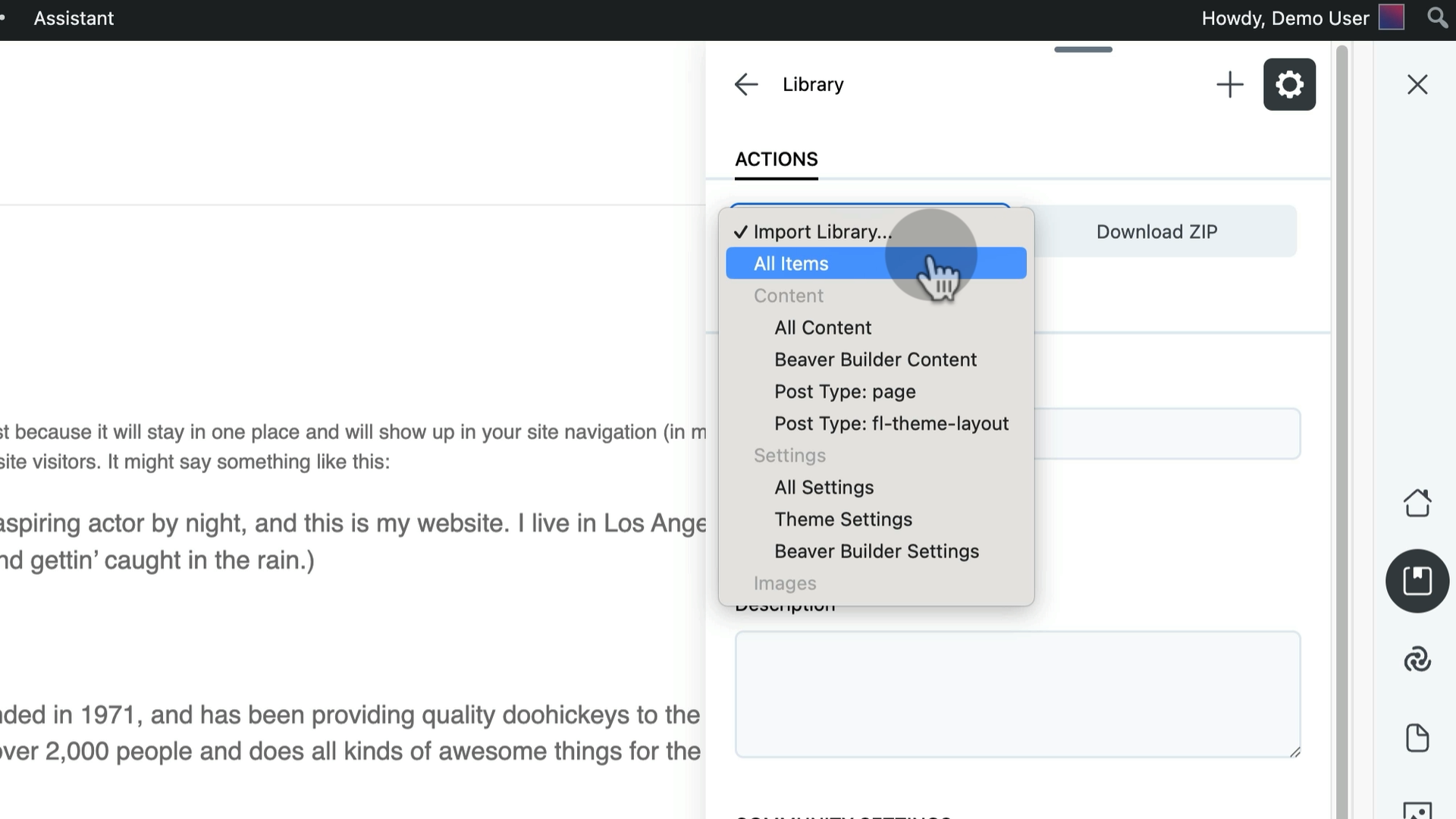
The available options include:
- All Content
- Beaver Builder Content (like BB-designed pages and templates)
- Specific Post Types
- All Settings
- Theme Settings
- Beaver Builder Settings
This flexibility matters. Maybe you’ve built a library that contains both page templates and site settings, but for a particular client project you only need the templates and not the settings. With this update, you can grab exactly what you need without overwriting anything you’d rather leave alone.
Smart Dropdowns That Only Show What’s Relevant
Here’s a detail that makes the experience even cleaner: the import dropdown is context-aware. All content type options are visible, but any option that doesn’t exist in the library you’re importing from will appear greyed out and won’t be selectable:
For example, if a library doesn’t contain any Beaver Builder content, you’ll still see that option in the list—but it’ll be greyed out so you can’t accidentally select it. You always have a clear picture of what’s available and what isn’t, without the dropdown hiding anything from you.
A Clearer Mental Model: Adding vs. Importing
One thing we want to make sure is clear, because it’s a distinction that comes up a lot:
- ADDING to a library stores content or settings in the cloud for later use.
- IMPORTING a library applies that stored content or settings to a live site.
These are two separate actions, and now both are much more granular and intentional. You’re no longer stuck with all-or-nothing in either direction.
3. Assistant Pro: In-App Notifications for Platform Updates
The third piece of this release isn’t inside the plugin itself; it’s a new feature coming to the Assistant Pro platform.
When you’re logged into your assistant.pro account, you’ll now see a present icon in the top-right corner of the interface:
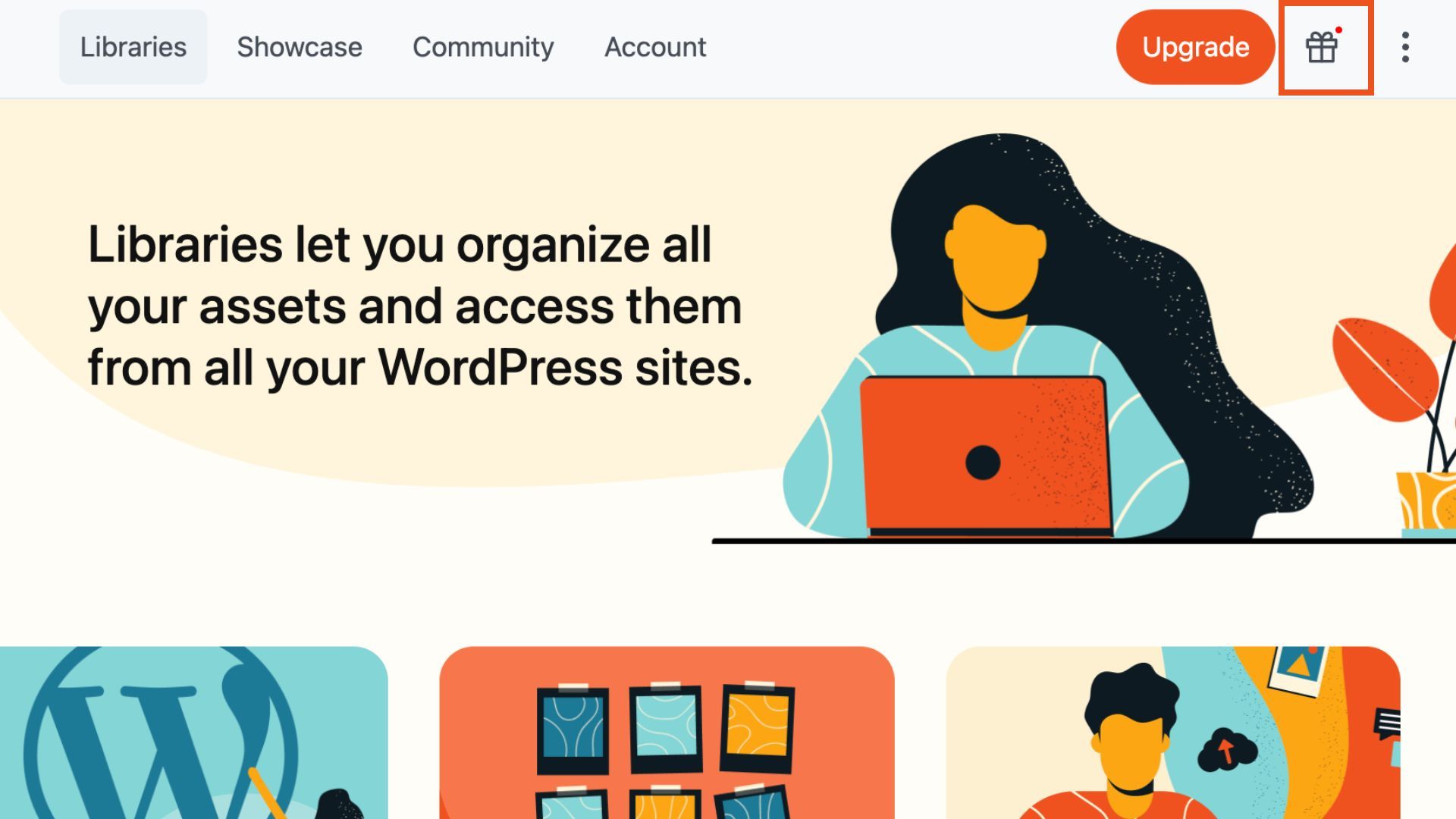
Click it to see what’s new on the platform such as: new features, updates to the library system, improvements to cloud syncing, and other announcements relevant to how you work.
As Assistant Pro continues to grow, especially with the Beaver Builder Cloud integration that’s now live, there’s more happening on the platform level that we want you to know about. These are things that directly affect your workflow, and you shouldn’t have to dig through release notes or check a changelog manually to find out about them.
Why These Assistant Updates Matter for Your Workflow
Taken together, these three improvements make Assistant significantly more powerful for anyone managing multiple WordPress sites, whether you’re a solo freelancer with a handful of clients or an agency running dozens of builds at any given time.
To get these updates, please upgrade to version 1.5.4 of the Assistant plugin.
- Standardize site configurations instantly. Save your preferred Beaver Builder setup once and apply it to every new project with a few clicks. No more manual export-import cycles.
- Import only what you actually need. Stop pulling in content you didn’t want and having to clean it up afterward. Selective imports give you precision without extra effort.
- Stay informed without hunting for updates. The new notification system means platform improvements come to you right inside Assistant Pro.
We hope you find these improvements make every web development project smoother and more efficient. If you haven’t explored these new features yet, now’s the perfect time to dive in and see how much smoother your workflow can be with Assistant PRO.
Have feedback or ideas for Assistant PRO? Let us know!

Our Newsletter
Our newsletter is personally written and sent out about once a month. It's not the least bit annoying or spammy.
We promise.
Try Beaver Builder Today

Related articles

Coming in Beaver Builder 2.10: Assistant Integration with Cloud Template Support
-
July 23, 2025
Beaver Builder 2.10 is just around the corner, and it brings a small—but mighty—new feature that’s going to streamline how…

NEW! Beaver Builder Agency Template
-
December 18, 2024
🔥 Unleash your agency’s full potential with the Beaver Builder Agency template, “Creative Catalysts.” This template mixes sleek professionalism with…
Assistant’s New Code App: Easily Manage Code Snippets in WordPress
-
September 9, 2024
In the world of WordPress development, having the right tools can make all the difference. That’s why we’re excited to…
Join the community
We're here for you
There's a thriving community of builders and we'd love for you to join us. Come by and show off a project, network, or ask a question.


Since 2014
Build Your Website in Minutes, Not Months
Join Over 1 Million+ Websites Powered By Beaver Builder.