
What Are Beaver Builder Components? Beginner’s Guide to Reusable Layouts
 -
March 3, 2026
-
March 3, 2026
Are you rebuilding the same layouts over and over in WordPress? If so, Beaver Builder Components are about to save you a lot of time.
Beaver Builder Components let you build reusable layouts once and reuse them across your site. Control which parts stay locked and which stay editable. This gives you design consistency with content flexibility across every page.
This guide is the first article in a 3-part series:
- Part 1: What Are Beaver Builder Components? Beginner’s Guide to Reusable Layouts ← You are here
- Part 2: How to Build Beaver Builder Components: Step-by-Step Tutorial
- Part 3: How to Nest Components in Beaver Builder (Made Simple)
In this article, you’ll learn what Beaver Builder components are, why they exist, and when to use them. By the end, you’ll know whether components belong in your web design workflow.
What Is a Beaver Builder Component?
A Beaver Builder component is a reusable layout you build once and reuse across your site. You decide which parts stay locked and which parts are editable. The result is consistent design with flexible content without breaking your layout on individual pages.
Components vs Templates vs Globals
Before components, Beaver Builder offered two options for reusing content: saved templates and globals.
- Templates let you reuse layouts — but they’re just copies. If something needs to change, you fix it everywhere manually. That gets old fast.
- Globals solve that by syncing changes sitewide. But one change affects every page, whether you want it to or not. That’s too rigid.
- Components give you the best of both. Your design stays consistent. Your content stays flexible.
Here’s a quick breakdown:
| Templates | Globals | Components | |
| Reusable layout | ✅ | ✅ | ✅ |
| Syncs Sitewide | ❌ | ✅ | ✅ |
| Selective Editing | ❌ | ❌ | ✅ |
| Locks Design | ❌ | ✅ | ✅ |
You might also like to read this article: Components vs Globals vs Templates
A Real-World Example
For example, imagine you want to design a hero section that can be used across multiple pages. The colors, background, spacing, and button style stay the same. But the headline, button text, and button link change per page:
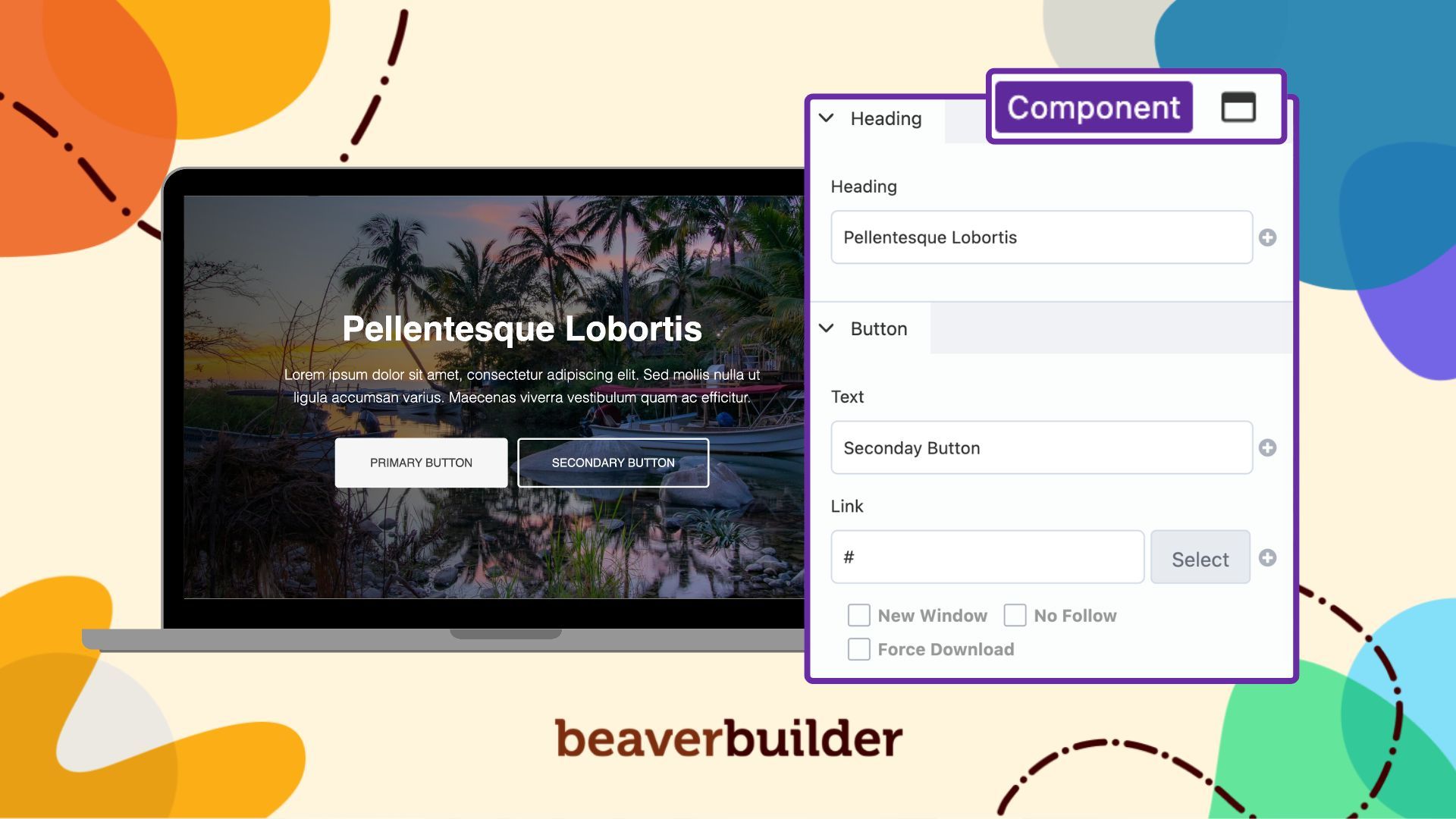
Components handle this perfectly. Lock the design. Flex the content.
Why Components Are a Game-Changer
Components bring three major advantages to your workflow:
- Consistency: Core elements such as structure, styles, and spacing can remain global.
- Flexibility: Individual fields for modules such as images, text, and colors can be enabled for per page editing.
- Efficiency: Build once, reuse everywhere, and update global styles with confidence.
With Components, you spend less time recreating layouts and more time focusing on unique page content.
When Should You Use Components?
Use components when you want consistent layouts with flexible content.
They’re a great fit for:
- Hero sections — same design, different headlines and CTAs
- Pricing blocks — locked layout, updated prices per page
- Testimonials — protected design, swappable quotes
- Promotional banners — reused across pages, easy text updates
Components also shine on client sites. Give clients editing control without letting them break your design. Your clients can update the website content, but they can’t touch the layout.
What’s Next?
In this article, we covered what components are and when to use them.
In Part 2, we’ll walk through exactly how to build a component step by step. You’ll see how to create a component, lock your design elements, enable editable fields, and drop it onto any page.
Continue reading: How to Build a Beaver Builder Component: Step-by-Step Tutorial

Our Newsletter
Our newsletter is personally written and sent out about once a month. It's not the least bit annoying or spammy.
We promise.
Try Beaver Builder Today

Related articles
How Beaver Builder Products Work Together to Build Flexible WordPress Websites
-
May 21, 2026
Building a WordPress website often means stitching together a theme from one developer, a page builder from another, and a…

From Azeroth to WordPress: How Warcraft Tavern Uses Beaver Builder
 -
May 19, 2026
-
May 19, 2026
Since releasing Beaver Builder 12 years ago, a feeling will come up from time to time that just never gets…
How to Build Card Layouts in Beaver Builder (Flexbox + Box Module Tutorial)
-
April 27, 2026
If you’re using the Beaver Builder Box Module to build responsive layouts, you’ve likely noticed two things: it’s incredibly powerful…
Join the community
We're here for you
There's a thriving community of builders and we'd love for you to join us. Come by and show off a project, network, or ask a question.


Since 2014
Build Your Website in Minutes, Not Months
Join Over 1 Million+ Websites Powered By Beaver Builder.