
Beaver Builder 2.10: Components, Better Accessibility, and Box Templates
 -
October 14, 2025
-
October 14, 2025
TL;DR: Beaver Builder 2.10 introduces Components (dynamic global templates), Cloud integration, 60+ new Box module templates, Star Rating module, major accessibility improvements, and faster workflows.
What’s New In Beaver Builder 2.10?
We’re excited to announce that Beaver Builder 2.10, also known as Monticello, is here:
This latest release represents months of thoughtful development focused on what matters most to our community: powerful new features, enhanced accessibility, and streamlined workflows that make building beautiful websites faster and more intuitive than ever.
Whether you’re a seasoned Beaver Builder pro managing multiple client sites or just starting your web design journey, version 2.10 delivers meaningful improvements that will transform how you build. Let’s dive into everything that’s new.
Game-Changing New Features
Components: Dynamic Global Templates That Adapt
Possibly the most exciting addition in Beaver Builder 2.10 is Components: reusable design elements that bridge the gap between global consistency and page-specific customization:
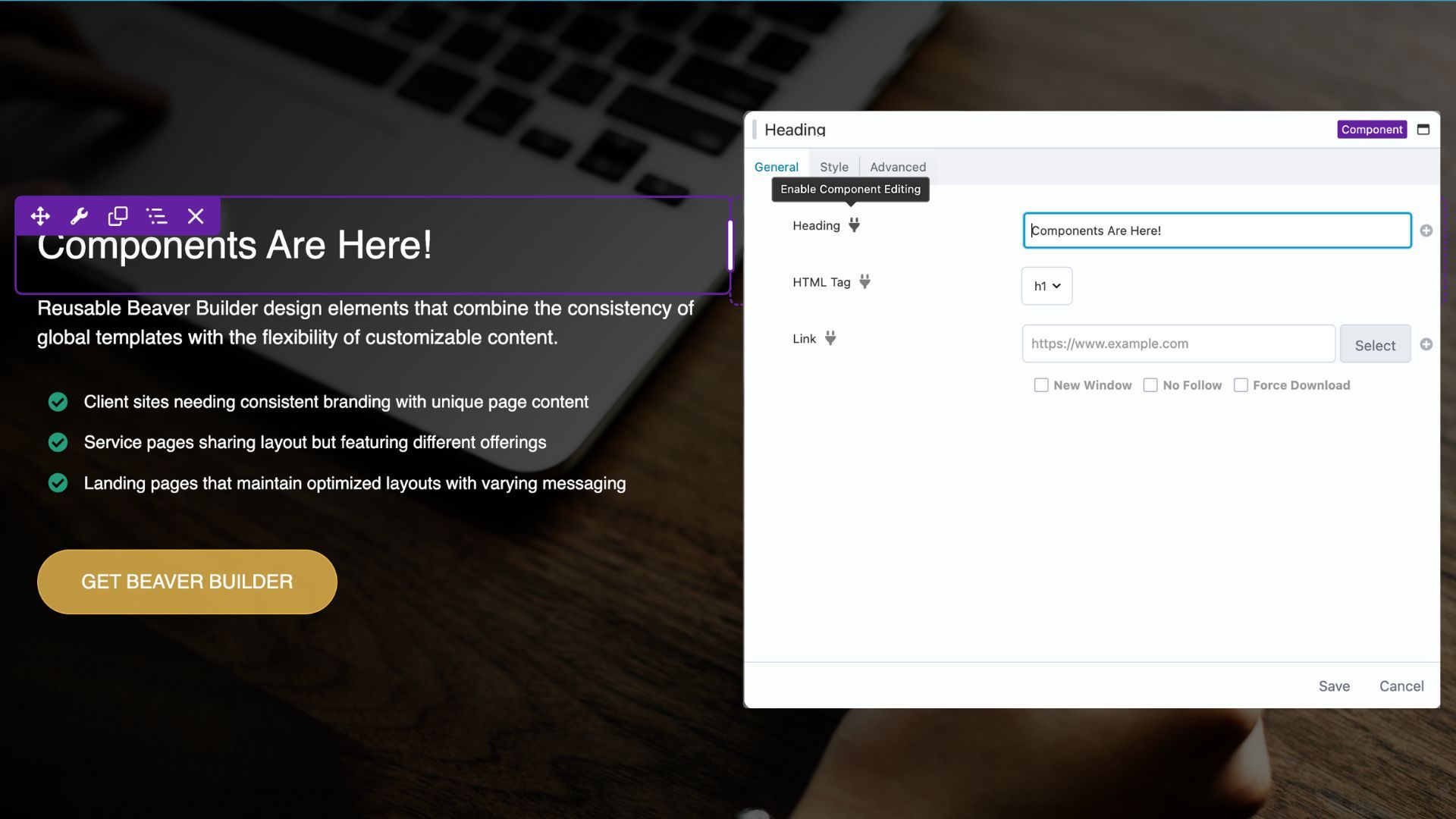
Traditional global elements are great for consistency but limiting when you need variations. Components, also known as Dynamic Global Templates, solve this by letting you create template structures where some elements remain global while others can be customized per page.
For example, with Components, you can now create a hero section where the global elements such as layout, button styling, typography, spacing, and animations stay consistent across every page. At the same time, you can make custom changes per page, like updating headlines, swapping background images, changing button text, or adjusting call-to-action copy.
Components work seamlessly with Beaver Builder’s existing global template system, giving you unprecedented control over your design workflow while keeping your site flexible and consistent.
We created a video series walking you through the Components feature:
- VIdeo 1: What Are Beaver Builder Components?
- Video 2: How to Build a Component in Beaver Builder
- Video 3: How to Nest Components in Beaver Builder
Beaver Builder Cloud
Another exciting addition is Beaver Builder Cloud, powered by Assistant Pro, now built directly into the Beaver Builder interface with no extra plugin needed:
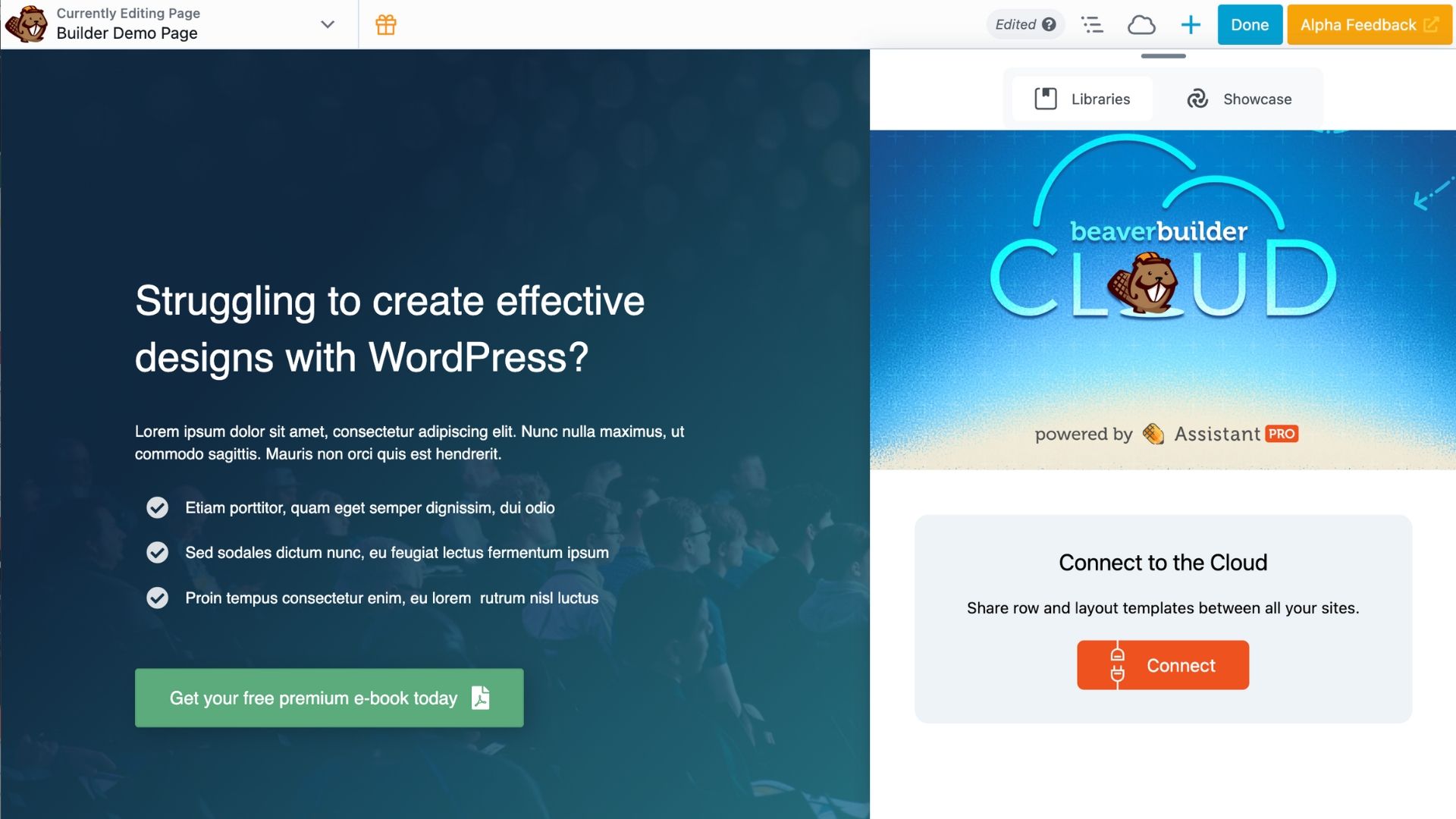
With Beaver Builder Cloud you can store, manage, and share WordPress assets such as templates, modules, and components in one centralized library. Reuse your favorite designs across multiple sites, saving time and maintaining consistency.
Cloud integration also makes team collaboration easy. Share templates with team members or clients, ensuring everyone works from the same approved designs. This is perfect for agencies or multi-site workflows.
By integrating the power of Assistant Pro directly into the page builder, Beaver Builder Cloud makes designing faster, smarter, and more connected than ever. Learn more about Beaver Builder Cloud →
Copy & Paste in the Outline Panel
We’ve heard your requests for more efficient editing workflows, and we’re delivering with copy and paste functionality directly in the Outline Panel.
This seemingly simple addition is actually a massive time-saver. Instead of rebuilding settings across multiple elements, you can now copy configurations from one element and instantly apply them to another.
Right-click any element in the Outline Panel, copy its settings, then paste them to any compatible element. It’s one of those features that once you start using, you’ll wonder how you ever lived without it.
60+ New Box Module Templates for Instant Inspiration
Designer’s block is real, and we’re here to help. Beaver Builder 2.10 introduces over 60+ pre-built Box module templates designed to give you instant starting points for common design patterns:
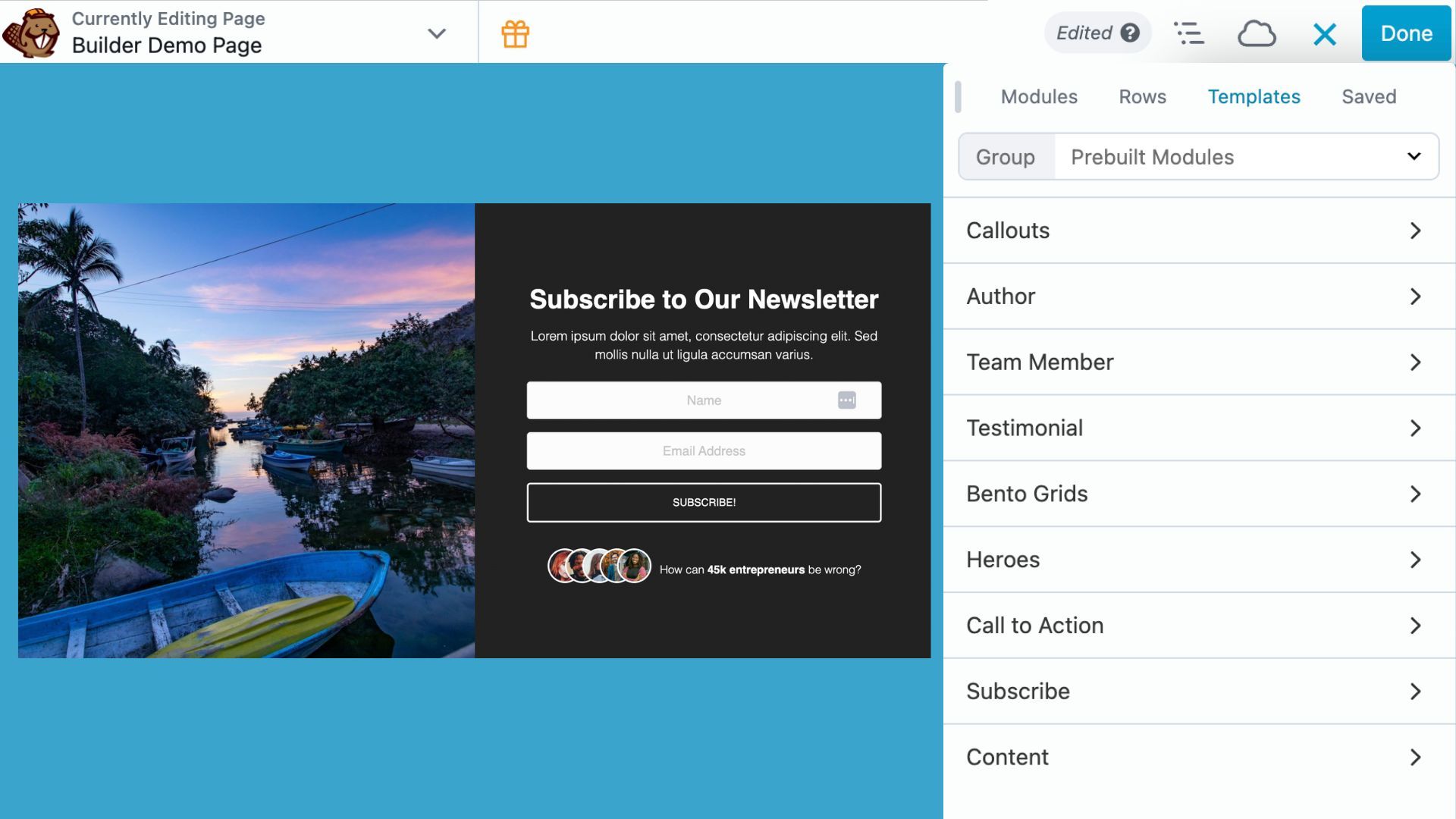
These aren’t just basic layouts; they’re thoughtfully designed templates that showcase best practices for:
- Heroes, Callouts, and CTAs
- Author and Team Member profiles and Testimonials
- Content Layouts and Subscribe sections
Special note on Bento Grids: Bento-style layouts are included too! These trendy, flexible grids are perfect for modern websites. We recently shared a YouTube tutorial and blog post on creating them, and now they’re even easier with ready-made templates. Read the article: Bento Grid Design in WordPress with Beaver Builder’s Box Module
Each template is fully customizable and serves as both a time-saver and a learning tool. They demonstrate effective use of Beaver Builder’s styling options while providing professional starting points for your projects.
Star Rating Module: Perfect for Social Proof
Social proof is crucial for modern websites, and the new Star Rating module makes it simple to showcase reviews, testimonials, and feedback.
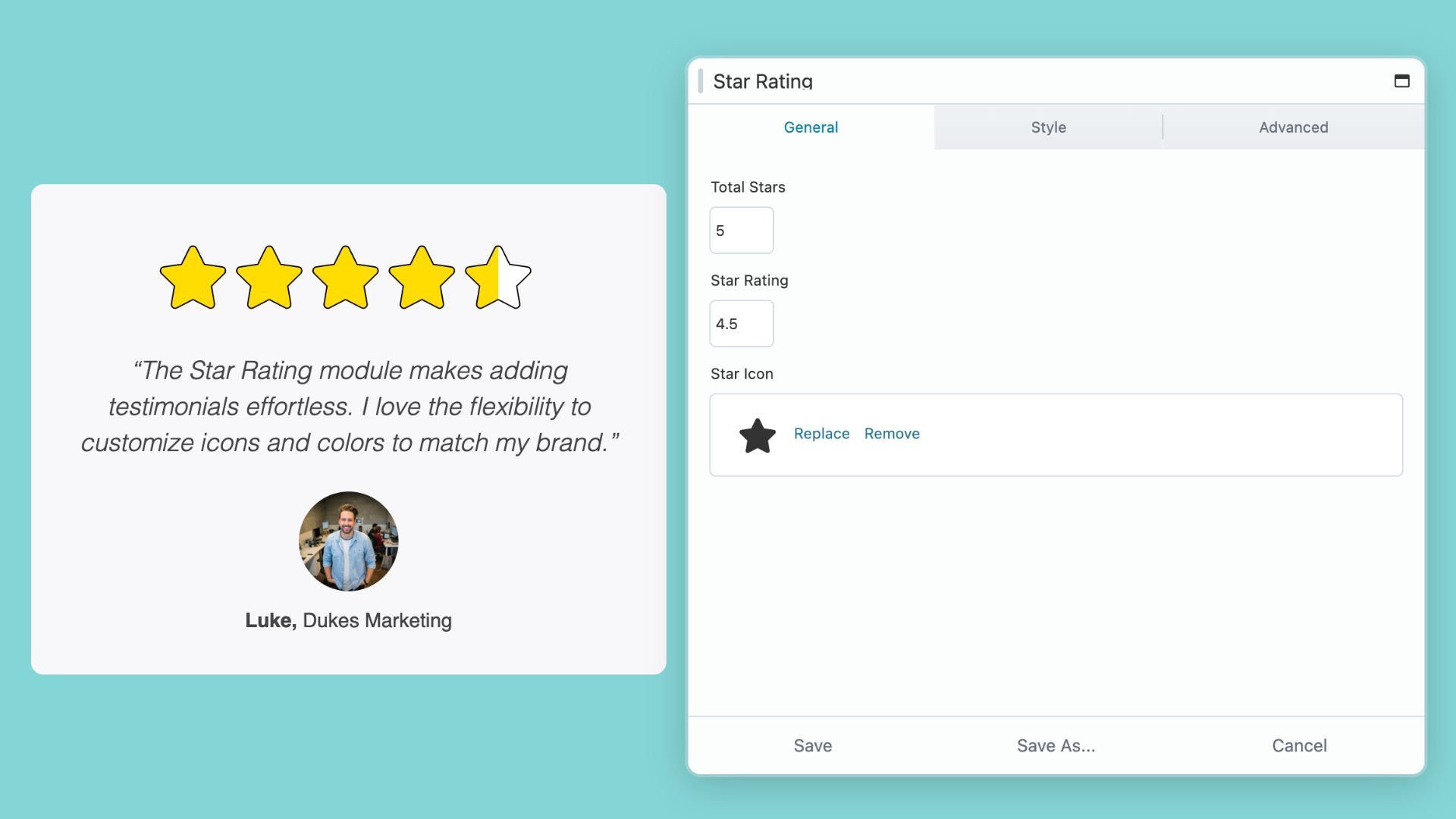
Customize everything from rating scales and icons to colors, spacing, and alignment, with full responsive design that looks great on any device.
Whether you’re highlighting customer testimonials, product reviews, or portfolio feedback, the Star Rating module adds credibility and polish to your site.
Module-Specific Upgrades
Box Module
The Box Module has quickly become one of Beaver Builder’s most popular additions, and version 2.10 brings key refinements:
Global Row Spacing
When Apply to Box is enabled in Global Settings, global row spacing will now also apply to Box modules in the top-level layout:
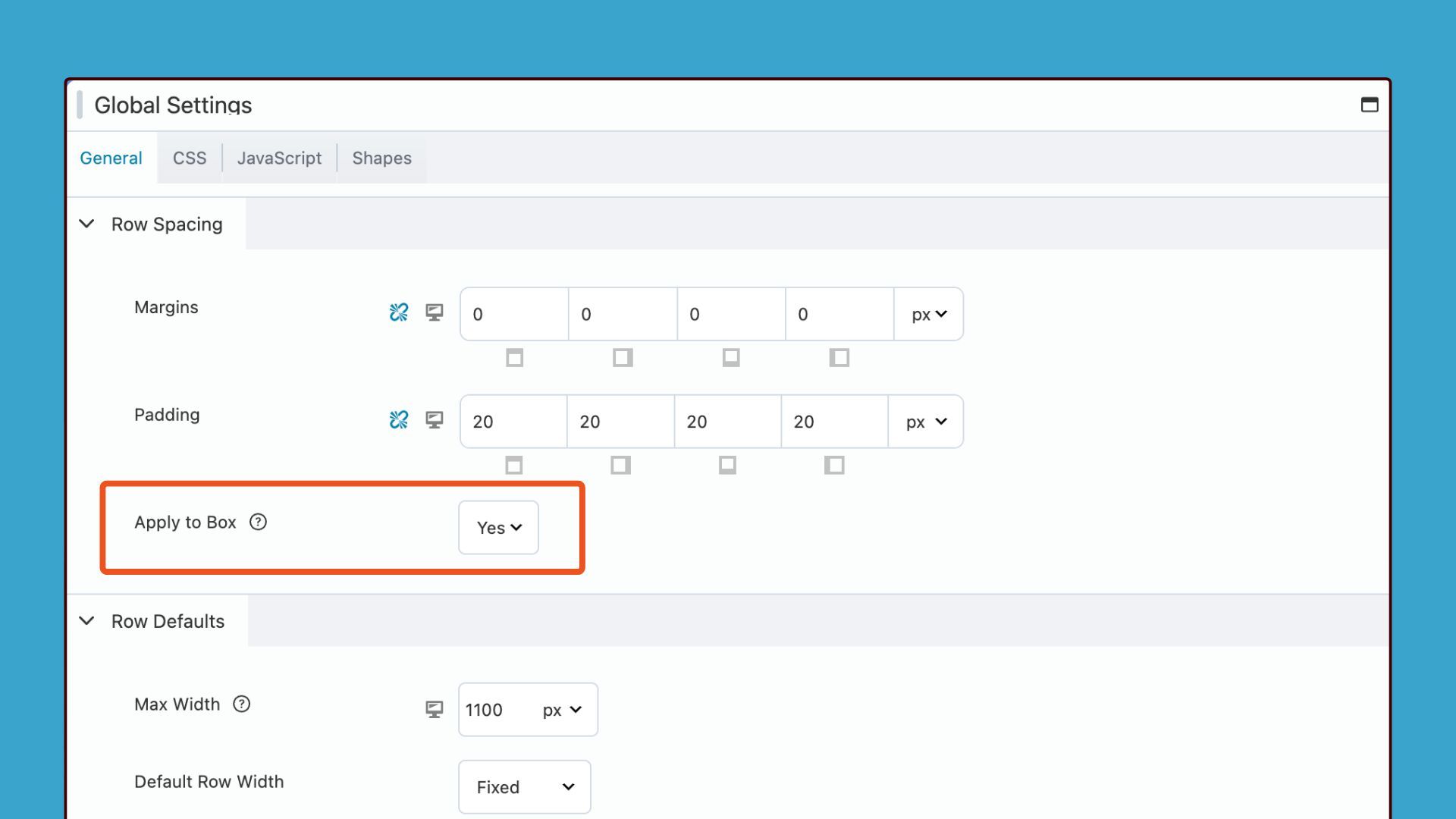
For new sites, this setting is enabled by default. For sites upgrading from 2.9, it remains disabled to maintain backward compatibility.
Grid Guidelines
A new grid icon has been added to the Box Module settings popup. Clicking it toggles a visual overlay of grid guidelines:
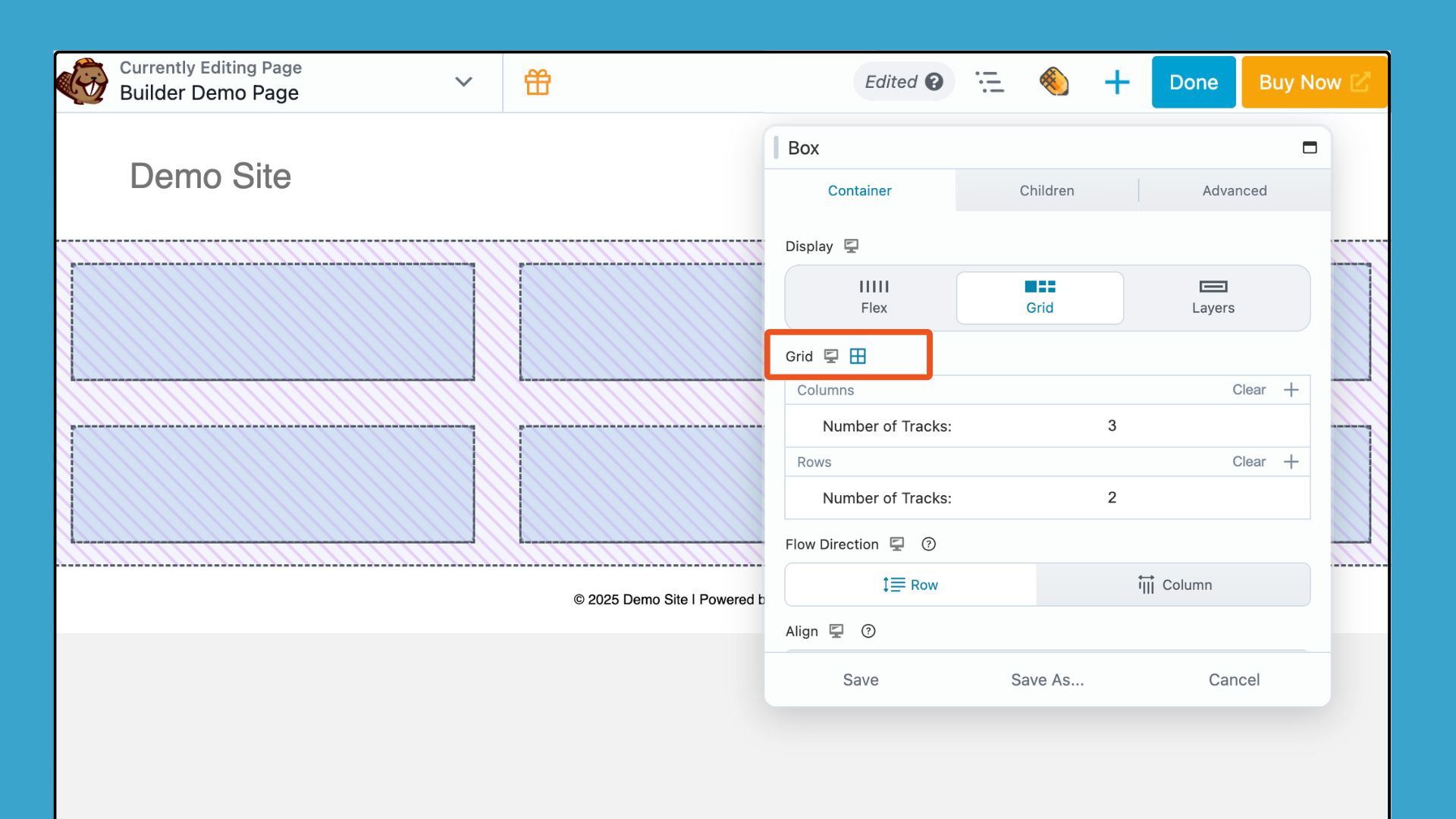
This gives you a more intuitive way to align and structure content as you build. It’s perfect for designers who prefer a visual approach to grid-based layouts.
Read more about how to enable this feature here: Struggling with CSS Grid? Turn This On in Beaver Builder
Button Module
The Button Module is now more flexible on smaller screens. Now includes responsive controls for border color, custom width, text color, and background colors.
Menu Module
The Menu module gets an upgrade with a new width option for flyout menus, giving you greater control over appearance and design.
Subscribe Module
Email marketing integrations take a step forward with the Subscribe Module, which now includes support for Kit (formerly ConvertKit) custom fields. This allows for more sophisticated audience targeting and segmentation, making your email campaigns even more powerful.
Accessibility Improvements
Accessibility was a cornerstone focus for Beaver Builder 2.10. This release improves semantics, keyboard navigation, and ARIA attributes across many modules, making sites more inclusive for all users.
This release introduces wide-ranging updates that improve semantics, keyboard navigation, and ARIA attributes across many modules. Key accessibility improvements include:
- Accordion Module: Improved HTML structure, focus visibility, and keyboard interaction.
- Content Slider: Better focus rings, reduced-motion support, and list/button markup.
- Gallery & Posts Modules: Updated to use semantic list tags instead of divs.
- Menu Module: Enhanced keyboard navigation and ARIA support.
- Testimonials Module: Switched to blockquote for proper semantics.
- Tabs Module: Uses button tags instead of links/divs, improving accessibility for screen readers.
Accessibility remains a long-term commitment, and community feedback continues to shape the roadmap. With 2.10, you can be confident your sites are not only beautiful but also usable for every visitor. Learn more about Beaver Builder Accessibility →
UI Changes
Beaver Builder 2.10 introduces several refinements to the user interface, making the editing experience more intuitive and efficient:
- Content Panel: The pre-built rows and modules panels now display categories instead of a dropdown, making browsing and selection faster and more visual.
- Saved Tab: Added the ability to collapse the saved rows, columns, and modules sections in the Saved panel.
- All Nodes: Added a Save As action in the settings dropdown on overlays, and a new Type select in the Save As settings popup to include Template, Global, or Component.
WP Admin Updates
Finally, in the WP Admin area, we’ve reworked the list table to clearly label items as Global or Component.
User access settings have also been refined. You can now allow editing of per-page component settings without granting access to edit the component itself. A new access setting also gives you control over enabling or disabling cloud access based on user roles.
Get Beaver Builder 2.10 Today
Beaver Builder 2.10 represents our commitment to continuous improvement and community-driven development. Every feature, refinement, and enhancement in this release comes from listening to our users and understanding the real challenges you face when building websites.
The combination of Components, Cloud integration, and enhanced accessibility makes 2.10 our most comprehensive update yet. We’re confident it will change how you approach website building, making you more efficient while helping you create more inclusive, professional sites.
Ready to experience everything new in Beaver Builder 2.10? Update your site today and start exploring the possibilities. Get Beaver Builder 2.10 Now →
Have questions about the new features or need help with the update? Our support team and community forums are here to help you make the most of Beaver Builder 2.10.
Resources:
- Official Beaver Builder Support
- Beaver Builder Documentation
- Beaver Builder Tutorials and Online Courses
- Beaver Builder Community Facebook Group
What feature in Beaver Builder 2.10 are you most excited about? Let us know in the comments below!

5 Comments
Our Newsletter
Our newsletter is personally written and sent out about once a month. It's not the least bit annoying or spammy.
We promise.
Try Beaver Builder Today

Related articles
How Beaver Builder Products Work Together to Build Flexible WordPress Websites
-
May 21, 2026
Building a WordPress website often means stitching together a theme from one developer, a page builder from another, and a…

From Azeroth to WordPress: How Warcraft Tavern Uses Beaver Builder
 -
May 19, 2026
-
May 19, 2026
Since releasing Beaver Builder 12 years ago, a feeling will come up from time to time that just never gets…
How to Build Card Layouts in Beaver Builder (Flexbox + Box Module Tutorial)
-
April 27, 2026
If you’re using the Beaver Builder Box Module to build responsive layouts, you’ve likely noticed two things: it’s incredibly powerful…
Join the community
We're here for you
There's a thriving community of builders and we'd love for you to join us. Come by and show off a project, network, or ask a question.


Since 2014
Build Your Website in Minutes, Not Months
Join Over 1 Million+ Websites Powered By Beaver Builder.
Woo, amazing!!
The new Loop module in 2.10 is a game-changer for agency workflows. We’ve been building dynamic content systems with BB for 10+ years and this update eliminates so much custom code. For agencies managing multiple client sites, the efficiency gains are massive. Great work BB team!
https://hypesites.com/beaver-builder-agency-transformation/
That’s fantastic to hear!
Can we please, please, pleeeeeas have proper aspect ratio controls on the photo module. Those fixed sizes are pointless and severely lacking!
Fantastic update, Jennifer! The new Components feature is a brilliant step forward — striking the perfect balance between global consistency and per-page flexibility. It’s the kind of innovation that really empowers design teams to scale efficiently while maintaining creative control.
We’re equally excited about the Beaver Builder Cloud integration. Centralized asset management and team-wide sharing will definitely streamline collaboration for agencies and development teams alike. The copy-paste functionality in the Outline Panel is another smart touch — simple, yet a huge productivity booster.
The addition of 60+ Box module templates and the Star Rating module shows how well the Beaver Builder team understands the practical needs of designers and developers.
Kudos to the team for such a thoughtfully executed release — these improvements will make a real difference in how we design and deliver engaging web experiences. 👏