

Why Agencies Are Switching to Beaver Builder: Performance Testing Results
 -
December 3, 2025
-
December 3, 2025
By Chris Smith – HYPEsites.com
For WordPress agencies, page builder choice directly impacts the metrics that matter most: project margins, team capacity, and how many billable hours disappear into revisions and maintenance.
After working with Elementor vs Beaver Builder performance across client projects involving multiple team members and revision rounds, I noticed consistent patterns. Build times varied significantly. Performance scores differed. Code quality impacted long-term maintenance costs. These weren’t subjective preferences. They were measurable efficiency gaps.
To quantify the differences, I built identical agency landing pages in both builders under controlled conditions: same hosting, same design, same assets. I measured build times, performance scores, and code output to understand the real operational impact.
This article shows you the testing results and provides a framework for evaluating builder efficiency based on your agency’s economics, so you can make an informed decision about where your team invests time.
The Agency Efficiency Challenge
The hidden cost of page builder choice isn’t the license fee. It’s the cumulative hours lost to inefficiency across every project, every revision cycle, and every new team member.
Agencies face consistent workflow bottlenecks: initial build time, client revision rounds, team onboarding, and ongoing support requests from clients who edit their own pages. The severity of these bottlenecks varies significantly between builders.
Across multiple projects involving juniors, contractors, and senior developers, I observed measurable differences in how quickly team members became productive. With Beaver Builder, most were building finished sections and pages within 1 to 3 days. With Elementor, that ramp-up time typically extended to 1 to 2 weeks due to more panels, nested settings, and styling layers.
Revision cycles revealed similar patterns. Implementing client feedback took less time when the builder’s interface was predictable and settings were consistent across modules.
When you multiply training time across multiple hires per year and compound it across dozens of client projects, builder efficiency becomes a significant operational cost.
How I Tested Page Builder Performance
To isolate builder performance from other variables, I created identical test conditions using complete technology stacks, not just the page builders in isolation.
Same Design
I built the same agency landing page layout with the following:
- Hero section with background image
- Three-column feature grid with icon callouts
- Call-to-action footer
No plugins, no custom code, just core functionality from each stack. The build steps were repeatable and consistent across both platforms:
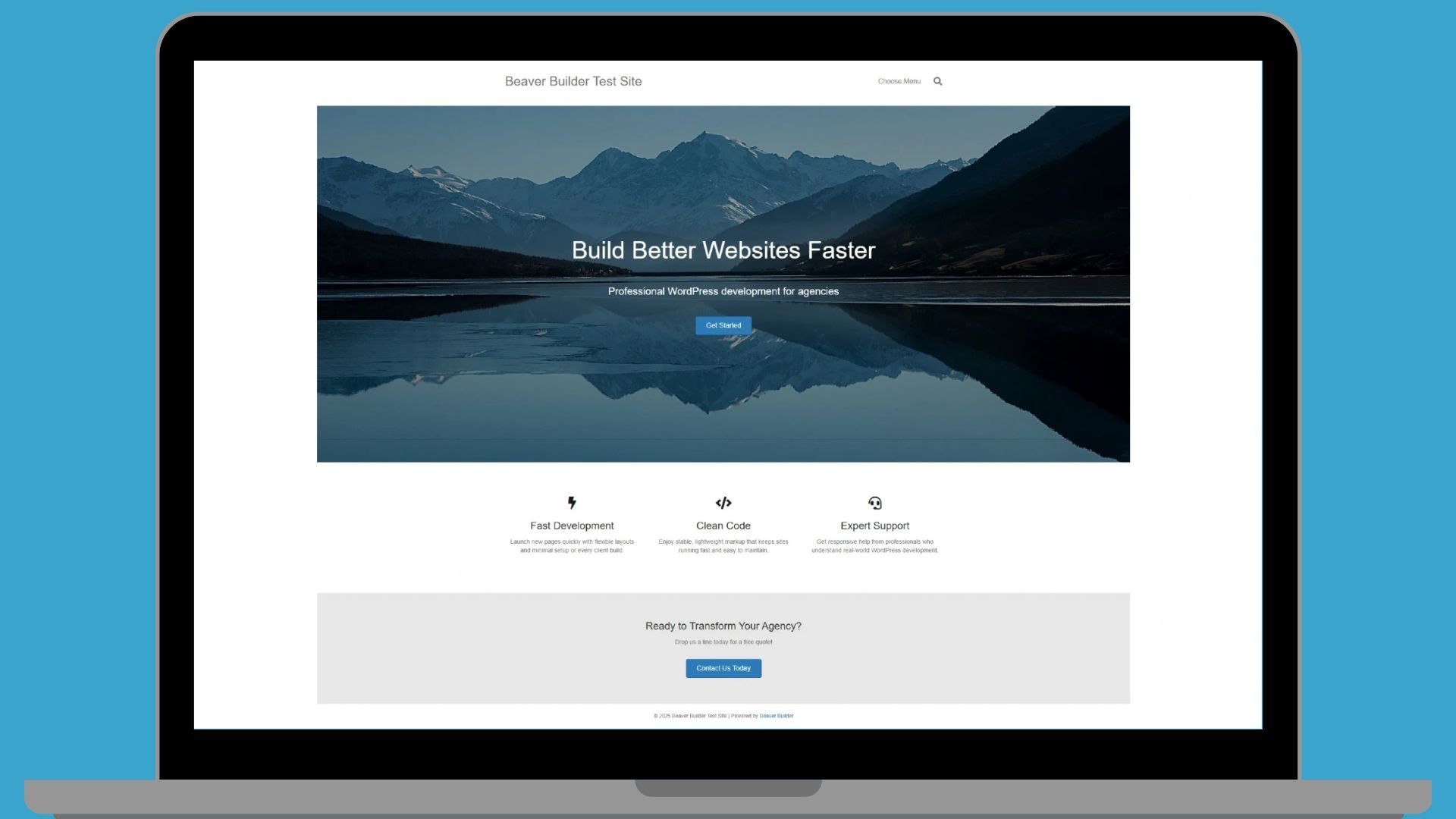
Technology Stacks Tested
Beaver Builder stack:
Elementor stack:
- Hello Theme
- Elementor page builder
- Elementor Pro with Theme Builder
Same Hosting Environment
Both sites ran on identical WP Engine staging environments with the same WordPress version and server resources. All caching layers were cleared before testing to ensure accurate measurements.
Same Assets
Identical images (1920x1280px hero background) and content. Typography used default Google Fonts from each theme’s customizer settings. File sizes matched across both builds to eliminate performance variables unrelated to the builder.
Measured Build Time
I timed full start-to-finish builds with a stopwatch, representing real-world agency workflow under typical production conditions.
Tested Performance and Code Output
After publishing, I measured both sites using PageSpeed Insights and GTmetrix from the same geographic location within minutes of each other. I also examined the generated HTML markup to understand code efficiency and DOM size differences.
Why These Metrics Matter
Build time directly impacts project capacity. Performance scores affect client satisfaction and SEO. Code output determines long-term maintenance burden. Under production pressure, these differences compound across every project your agency delivers.
Elementor vs Beaver Builder Performance Results
The testing revealed three significant differences that all stem from the same architectural philosophy: workflow simplicity versus granular control.
Build Speed: An 80% Time Difference
- Beaver Builder: 10 minutes
- Elementor: 18 minutes
That’s an 8-minute difference for a simple three-section landing page. The Beaver Builder interface required fewer decisions at each step. Add a row, drop in modules, style them, publish. The streamlined workflow maintained momentum.
Elementor required more navigation between panels, more precise container nesting, and more granular spacing decisions. Every widget offered additional styling options, which slowed the build process despite the increased control.
The Compounding Effect at Scale
For a single page, 8 minutes feels minor. At agency scale, it compounds dramatically:
An agency building 50 pages per month saves 400 minutes with Beaver Builder (6.7 hours monthly, 80 hours annually). At $150 per billable hour, that’s $12,000 in recovered capacity. For agencies building 100+ pages monthly, the savings approach $24,000 annually in developer time alone.
Mobile Performance: Where the Gap Widens
The PageSpeed Insights testing showed a clear mobile performance advantage:
- Mobile: Beaver Builder scored 97 vs Elementor’s 88
- Desktop: Essentially tied (98 vs 99)
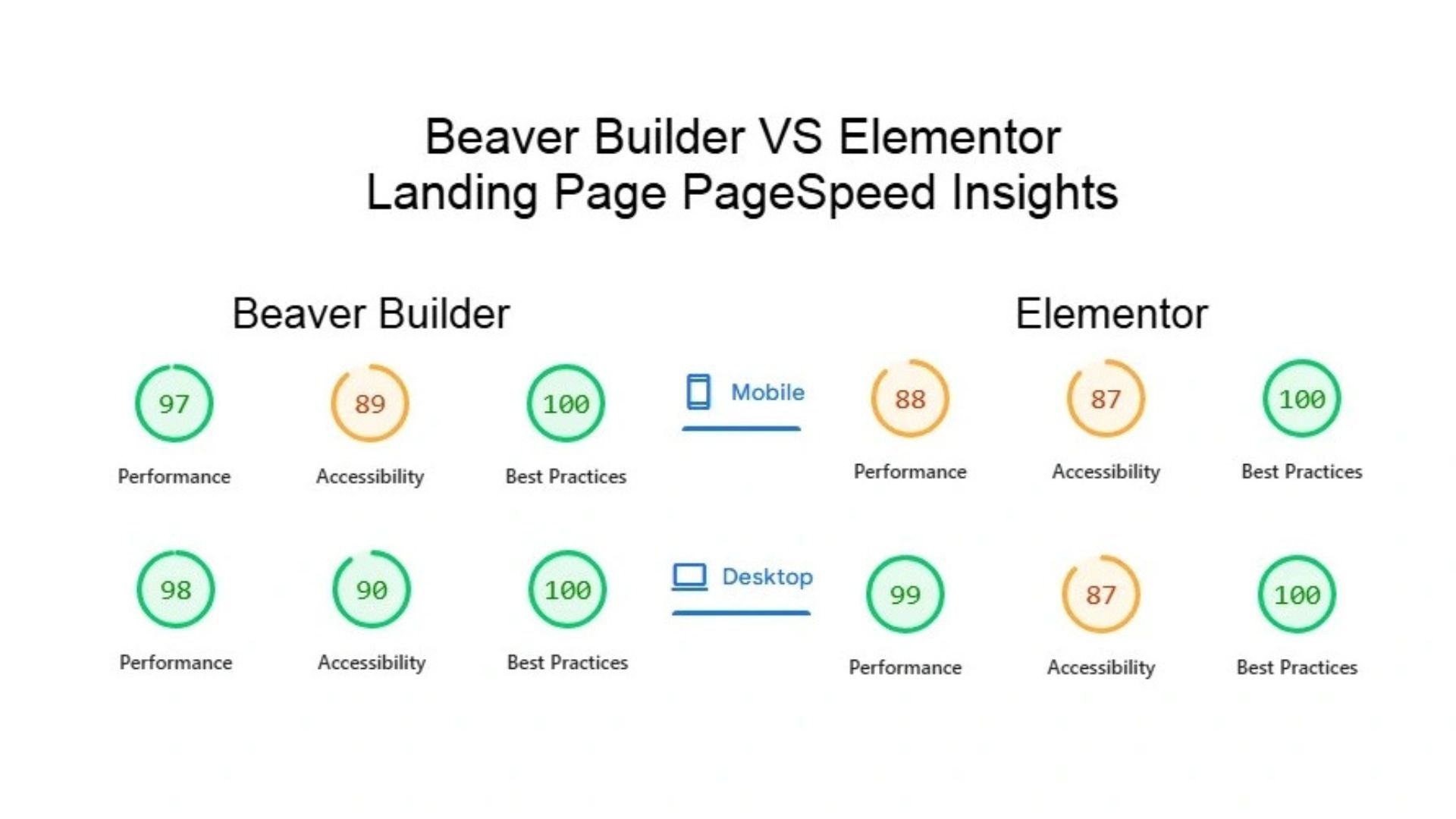
The 9-point mobile gap matters. Google’s ranking algorithm prioritizes mobile performance, and most traffic now comes from mobile devices. This translates to real impact on user experience and search visibility for client sites.
Code Quality: The Underlying Cause
Inspecting the HTML markup revealed why the mobile performance differed. For the three feature callouts:
- Beaver Builder: ~8 wrapper divs per callout
- Elementor: ~11 wrapper divs per callout
That’s 37% more markup. Elementor’s class names were also significantly longer, adding CSS overhead:
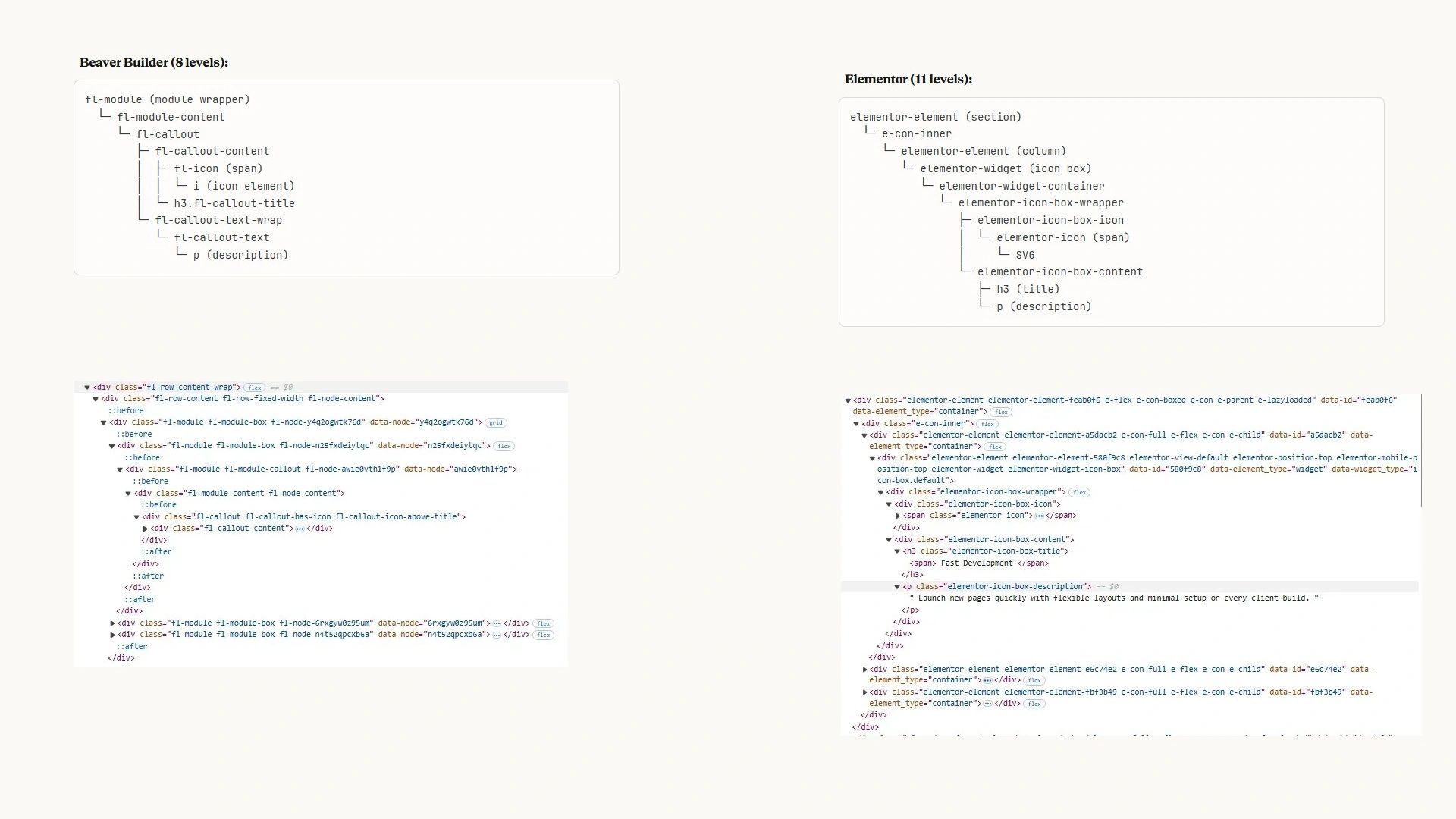
Why wrapper count matters: Mobile devices have limited processing power compared to desktops. Every
additional DOM element requires memory allocation, CSS selector matching, and layout calculation. On
desktop machines with ample resources, this overhead disappears. On mobile devices, the leaner Beaver
Builder markup delivered measurably faster performance.
Business Impact: The Agency Math
The performance differences translate directly to agency economics in three areas: project capacity, client retention, and maintenance overhead.
Project Capacity: Time Multiplied by Volume
An 8-minute difference per page seems minor until you calculate annual impact. For an agency building 50 pages monthly:
- 50 pages × 8 minutes = 400 minutes saved monthly (6.7 hours)
- 6.7 hours × 12 months = 80 hours annually
- 80 hours × $150/hour = $12,000 in recovered capacity
For agencies building 100 pages monthly, that becomes $24,000 annually.
This isn’t a one-time efficiency gain. These savings recur every year, compounding as your agency grows. The developer time recovered can be redirected to new projects, reducing the need to hire additional staff or turn
away work.
There’s also a retention benefit that’s harder to quantify: developers who finish projects faster experience less deadline pressure and burnout. Happier teams stay longer, reducing costly turnover.
Client Satisfaction: Performance That Protects Revenue
The 9-point mobile performance advantage affects every visitor to every client site. Faster mobile load times improve user experience, reduce bounce rates, and strengthen SEO performance. When clients see better engagement metrics and search rankings, they renew contracts and refer new business.
Client retention is the highest-ROI metric in agency economics. Acquiring new clients costs five times more than retaining existing ones. Mobile performance directly impacts retention by delivering measurable results clients can see in their analytics.
Mobile performance also reduces client complaints. Slow mobile sites generate support requests. Fast sites generate testimonials.
Maintenance Economics: Code Quality as Cost Control
Cleaner markup reduces long-term maintenance burden. Fewer wrapper divs mean faster page rendering, easier debugging, and more predictable behavior across WordPress updates. Sites built with leaner code require less intervention over their lifetime.
For agencies managing 30+ client sites on monthly retainers, maintenance efficiency determines profitability. When routine updates take 20 minutes instead of 45 minutes because the codebase is cleaner and more predictable, those savings compound across every maintenance cycle, every month, for years.
The builder choice made during initial development continues affecting agency economics long after project launch.
Making the Decision: Your Evaluation Framework
Page builder choice should align with your agency’s operational reality, not abstract preferences. The right tool depends on your project mix, team size, and what creates friction in your current workflow.
Consider Beaver Builder if:
- You build 30+ pages monthly where efficiency compounds
- Mobile performance affects client SEO and retention
- You need faster team onboarding, especially with junior developers or contractors (days vs weeks)
- Maintenance profitability matters on retainer contracts
- Code quality affects long-term support burden
- Team consistency matters more than individual creative flexibility
Consider Elementor if:
- You build fewer than 20 highly customized pages monthly
- Design flexibility outweighs build speed in your project pricing
- Your team already has deep Elementor expertise (switching costs matter)
- Clients require granular visual control over spacing, animations, and styling details without developer intervention
Next Steps:
The testing methodology described here is repeatable. Build the same page in both builders with a stopwatch, then test the results. Your specific workflow, team composition, and project types will determine which efficiency gains matter most.
For practical guidance on implementation:
- Detailed feature comparison and workflow analysis for agencies
- Step-by-step migration guide for switching builders without breaking client sites
Conclusion
Page builder choice isn’t about feature counts or widget / module libraries. It’s about operational efficiency that compounds across every project your agency delivers.
The testing data shows measurable differences:
- 80% faster build times
- 9-point mobile performance advantage
- 37% leaner markup.
These aren’t marginal gains. They’re structural advantages that affect project capacity, client retention, and maintenance profitability. Builder efficiency is revenue logic, not personal preference.
If you want to validate these findings for your specific workflow, run the same test. Build an identical page in both builders, time it, and measure the output. Your agency’s numbers will tell you which tool creates less friction and more capacity.
Chris Smith is the founder of HYPEsites, a WordPress development agency specializing in Beaver Builder implementation and agency transformation. With 14+ years of experience and 650+ sites delivered, he helps agencies standardize their operations for improved profitability and scalability.

Our Newsletter
Our newsletter is personally written and sent out about once a month. It's not the least bit annoying or spammy.
We promise.
Try Beaver Builder Today

Related articles
How Beaver Builder Products Work Together to Build Flexible WordPress Websites
-
May 21, 2026
Building a WordPress website often means stitching together a theme from one developer, a page builder from another, and a…

From Azeroth to WordPress: How Warcraft Tavern Uses Beaver Builder
 -
May 19, 2026
-
May 19, 2026
Since releasing Beaver Builder 12 years ago, a feeling will come up from time to time that just never gets…

How to Build Card Layouts in Beaver Builder (Flexbox + Box Module Tutorial)
-
April 27, 2026
If you’re using the Beaver Builder Box Module to build responsive layouts, you’ve likely noticed two things: it’s incredibly powerful…
Join the community
We're here for you
There's a thriving community of builders and we'd love for you to join us. Come by and show off a project, network, or ask a question.


Since 2014
Build Your Website in Minutes, Not Months
Join Over 1 Million+ Websites Powered By Beaver Builder.